Thinking in swiftUI
Overview
swiftUI is a radical conceptual departure from the previous way of developing apps on Apple's platforms, and it requires you to rethink how to translate an idea you have in mind into this new system.
View Construction
To construct views in SwiftUI, you create a tree of view values that describe what should
be onscreen. To change what’s onscreen, you modify state, and a new tree of view values
is computed. SwiftUI then updates the screen to reflect these new view values.
let write an example for a counter application and explain whats going on :
import SwiftUI

struct ContentView: View {
@State var counter = 0
var body: some View {
VStack {
  Button(action: { counter += 1 }, label: {
	Text("Tap me!")
	.padding()
	.background(Color(.tertiarySystemFill))
	.cornerRadius(5)
})

  if counter > 0 {
   Text("You've tapped A(counter) times")
   } else {
   Text("You've not yet tapped")
   }
  }
 }
}
The ContentView contains a vertical stack (VStack) with two nested views: a button, which increments the counter property when it’s tapped, and a text label that shows either the number of taps or a placeholder text.
notice that the button's action closure does not change the tap count Text view directly. the closure does not have a reference to that and even if it had, modifying it after the view is presented will not change the presentation. Instead, we need to modify our state
(in this case the @State counter variable).
this causes SwiftUI to call the view's body, generating a new description of the view with the new value of counter.
lets talk about the body property, var body: some View this does not tell us much about the view tree that we see on screen, its only says that whatever is being constructed definitely conforms to the View protocol. the real type of the body looks like this:
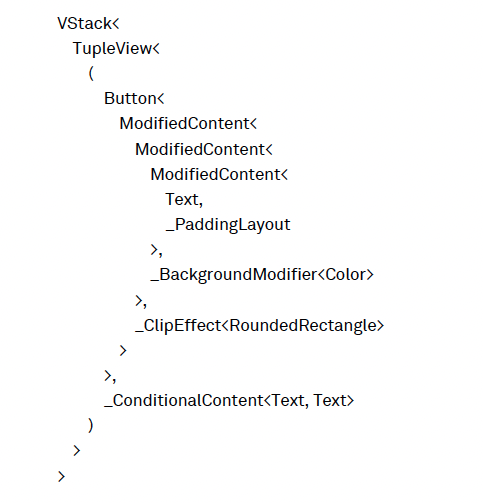
That’s a huge type with lots of generic parameters — and it immediately explains why a construct like some View (an opaque type) is required for abstracting away these
complicated view types.
here is the view above as a tree diagram :
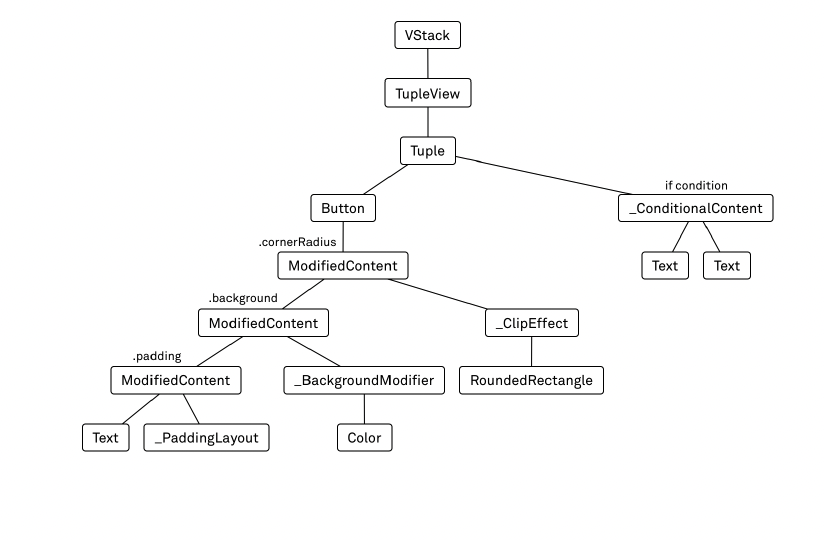
the body var contains the structure of the entire view tree- not just the part that on screen at the moment, but all views that could ever be onscreen during the app's lifecycle. when we create a condition
(if counter > 0) the if statement create has been encoded as a value of type ConditionalContent, which contains the type of both branches.
but how it is possible? the views are not evaluated at runtime?
to make this possible, SwiftUI leverages a swift feature called function builders .
As an example, the trailing closure after VStack is not a normal Swift function; it’s a ViewBuilder (which is implemented using Swift’s function builders feature). In view builders, you can only write a very limited subset of Swift: for example, you cannot write loops, guards, or if lets. However, you can write simple Boolean if statements to construct a view tree that’s dependent on the app’s current state .
the advantage of the view tree containing the entire structure instead of just the currently visible structure is that its more efficient for SwiftUI to figure out what has changed after a view update.
The second feature to highlight in this type is the deep nesting of ModifiedContent values. The padding, background, and cornerRadius APIs we’re using on the button are not simply changing properties on the button. Rather, each of these method calls creates another layer in the view tree. Calling .padding() on the button wraps the button in a value of type ModifiedContent, which contains the information about the padding that should be applied.
Since all these modifiers create new layers in the view tree, their sequence often matters. Calling .padding().background(...) is different than calling .background(...).padding(). In the former case, the background will extend to the outer edge of the padding; the background will only appear within the padding in the latter case.
View Builders
As mentioned above, SwiftUI relies heavily on view builders to construct the view tree. A view builder looks similar to a regular Swift closure expression, but it only supports a very limited syntax. While you can write any kind of expression that returns a View, there are very few statements you can write. The following example contains almost all possible statements in a view builder:
VStack {
	Text("Hello")
	if true {
		Image(systemName: "circle")
	}
	if false {
		Image(systemName: "square")
	} else {
		Divider()
	}
	Button(action: {}, label: {
		Text("Hi")
	})
}
the view being rendered is
VStack<
	TupleView<(
		Text,
		Optional<Image>,
		_ConditionalContent<Image, Divider>,
		Button<Text>
	)>
>
“Each statement in a view builder gets translated into a different type:
-
A view builder with a single statement (for example, the button’s label) evaluates to the type of that statement (in this case, a Text).
-
An if statement without an else inside a view builder becomes an optional. For example, the
if true { Image(...) }gets the typeOptional<Image>. -
An if/else statement becomes a _ConditionalContent. For example, the if/else above gets translated into a
_ConditionalContent<Image, Divider>.
Note that inside view builders, it is perfectly fine to have different types for the branches of an if/else statement (whereas you can’t return different types from the branches of an if statement outside of a view builder). -
Multiple statements get translated into a TupleView with a tuple that has one element for every statement. For example, the view builder we pass to the VStack contains four statements, and its type is:
TupleView<(
	Text,
	Optional<Image>,
	_ConditionalContent<Image, Divider>,
	Button<Text>
)>
Compared to UIKit
When we talk about views or view controllers in UIKit, we refer to instances of the UIView or UIViewController classes. View construction in UIKit means building up a tree of view controllers and view objects, which can be modified later on to update the contents of the screen.
View construction in SwiftUI refers to an entirely different process, because there are no instances of view classes in SwiftUI. When we talk about views, we’re talking about values conforming to the View protocol. These values describe what should be onscreen, but they do not have a one-to-one relationship to what you see onscreen like UIKit views do: view values in SwiftUI are transient and can be recreated at any time.
Another big difference is that in UIKit, view construction for the counter app would only be one part of the necessary code; you’d also have to implement an event handler for the button that modifies the counter, which in turn would need to trigger an update to the text label. View construction and view updates are two different code paths in UIKit.
In the SwiftUI example above, these two code paths are unified: there is no extra code we have to write in order to update the text label onscreen. Whenever the state changes, the view tree gets reconstructed, and SwiftUI takes over the responsibility of making sure that the screen reflects the description in the view tree.
ViewLayout
swiftUI layout system is very different than UIKit constraint or frame layout system.
SwiftUI starts the layout process at the outermost view.
In the above case that the ContentView containing a single VStack. The layout system offers the ContentView the entire available space, since it’s the root view in the hierarchy. The ContentView then offers the same space to the VStack to lay itself out. The VStack divides the available space by the number of its children, and it offers this space to each child (this is an oversimplification of how stacks divide up the available space between their children.