async await in swift - the basics
swift concurrency features pre async await :
- GCD - grand central dispatch
- Completion Blocks
- Combine#Promises and Futures
before we start talking about async await api , it is important to understand the problem it is trying to solve:
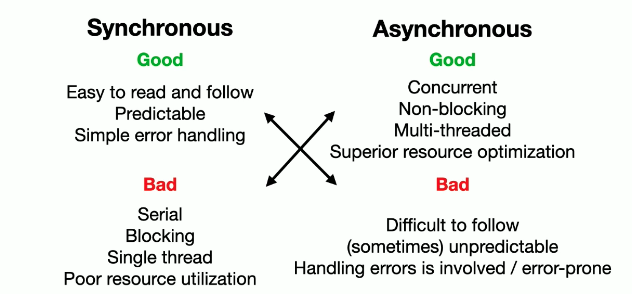
most of the time we developer are writing a synchronous code , but in some cases where we need more efficiency for our features, we might want to write asynchronous code to complete the task faster. this have advantages and disadvantages when the main cons to this approaches is "closure Hell" which make the code very unreadable.
async await basic
async await is a new syntax for concurrency which is a well defined and used across many other programming languages. (each with its own implementation).
async
async word let you define asynchronous functions for example:
func loadImage() async throws -> UIImage
when before this syntax we would mostly use:
func loadImage(completion: (Result<UIImage, Error>)->Void)
await
await let you wait for the result (simple right?) of an asynchronous function for example :
do {
	self.image = try await person.loadImage()
} catch {
	handleError(error)
}
(assuming that load image have an #async context using the #async word mentioned above).
Asynchronous context
an async function can only be called within an async context. in [swift] there are two main async context we can use:
- #async syntax on a function.
- Task - allow you to create async context for non- async methods. (you can read more in #Task headline)
func updatePersonInfo() {
	Task {
		do {
		  let image = try await person.loadImage()
		}catch{}
	}
}
replace closure hell with await
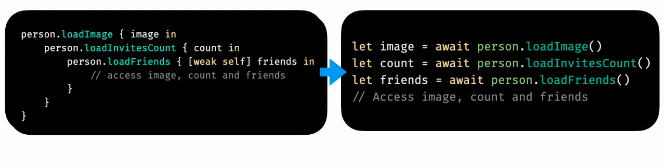
each await represent a completion block. this is a good syntax because it seems like a sync code but each of the await actually suspends and waits for the result before resuming to the next steps.
async await under the hood
Task
A [Task] is represents a unit of asynchronous work which could be a child of a different Task. It has several init that let us create a new #Asynchronous context :
Task {...}Task(priority) {...}
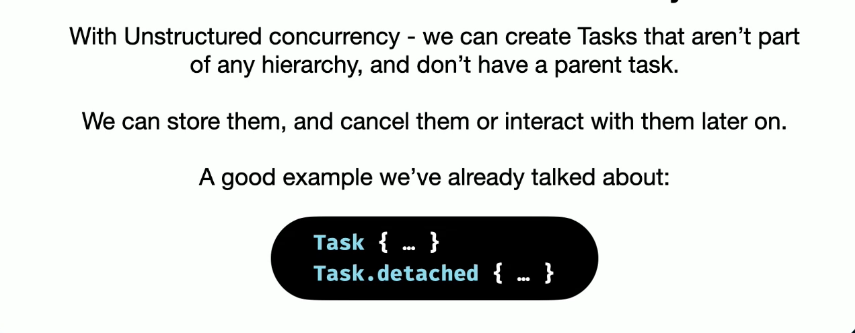
those init execute async but on the context they inherit (for example putting a task in a view controller will still run on main thread).Task.detached{...}will just run on some thread without inherit the context it is calling.
Task is actually generic over Success and Failure but the default is Void and Never.
Task {...} = Task<Void, Never> {...}
you can return a value using a task like the following :
let task = Task<String, Never> {
	return asyncString()
}
let result = await task.value
Cooperative Thread Pool
unlike what most might think. this api is not just a cool wrapper to GCD. the new concurrency module use a concept calls Cooperative Thread Pool model.
- A pool of threads available to run async functions
- Tasks must always make forward progress of suspend. that means that you cant just use a Task to block a thread in some context. it can go forward doing some computation in the context or suspend in order to wait for a computation result.
- no more than one thread per CPU core. In GCD this is not the case which can cause a thread explosion during blocking.
- Avoid the overhead and performance penalty of thread switching .
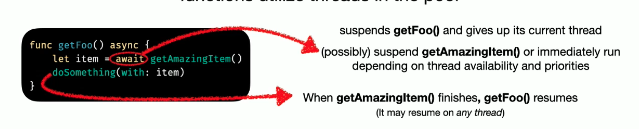
__the most important thing is that the cooperative thread pool can suspend tasks and resume them later. this is due to an abstraction called #Continuation.
when we mark a function as #async , swift know it can "suspend" and wait for result. than it can resume as needed, while other async function utilize threads in the pool.
Error handling
before, we would just kept checking for errors in each closure and check what kind of error it is and handle activation of the next block accordingly.
in async await api however it feels way more synchronous and natural :
do {
	try await async()
	try await async2()
	try await async3()
}catch let error {}
if any of the task fails, consecutive tasks will simply no run or cancel. the error above will be the instance the Task in each async method will be sending.
- should mention that the compiler and runtime prevents you from not returning a value or an error which this is a perk you would not get if using closures.
Async getters
a variable can also be async:
struct Person {
	let avatarURL : URL
	var avatarImage : UIImage?{
		get async throws {
			let (data, _) = try await URLSession.shared.data(from: avatarURL)
			return UIImage(data: data)
		}
	}
}

//use case:
let saar = Person(url: url)
profileImage.image = try await saar.avatarImage
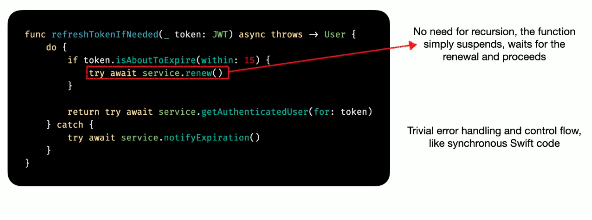
Cool use case used in MONDAY :
JWT refresh functionality can be tricky using completion blocks flow. (mostly use for user validation when authenticate).
Using async await in parallel
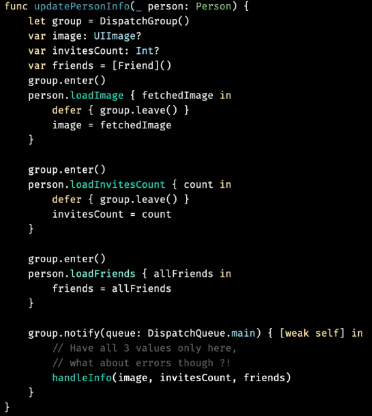
sometimes we want to run tasks without binding them to each other, before we would user procedure kit or Dispatch Groups
Dispatch group example:
async let bindings
let us run multiple independent tasks in parallel, while awaiting all of their results together. (you dont have to wait for the results if not needed).
func updatePersonInfo(_ persion: Persion) async {
	async let image = person.loadImage()
	async let count = person.loadInvitesCount()
	async let friends = person.loadFriends()

await handleInfo(image, count, friends)
}
Cancellation
async/await uses a Cooperative Cancellation mechanism. This means that each task is responsible to short circuit its own execution if its cancelled.
you can check cancellation in a task with the following :
try Task.checkCancellation()this throws a special CancellationError if the task was canceled and stops the control flow.- handle the cancellation yourself with
if Task.isCancelled {...} try await withTaskCancellationHandler(operation: {...}, onCancel: {...})you can add a cancellation block to a Task
Task groups
we might have a data structure to posses a some sort of data model objects. and we want each of those objects to perform a long async computed task (for example : load all current logged in user profile picture )
we might be tempted to do the following:
func getAllUserPhotos() async -> [UIImage] {
	var result = [UIImage] ()
	for person in people {
		await result.append(person.loadAvatar())
	}
	return result
}
this will work , how ever it will be synchronized for each person in the collection which will hurt performance.
what about #async let bindings?
async let will work only if we know how many tasks we will execute (so we can later add all of them to an await result)
Enter Task groups:
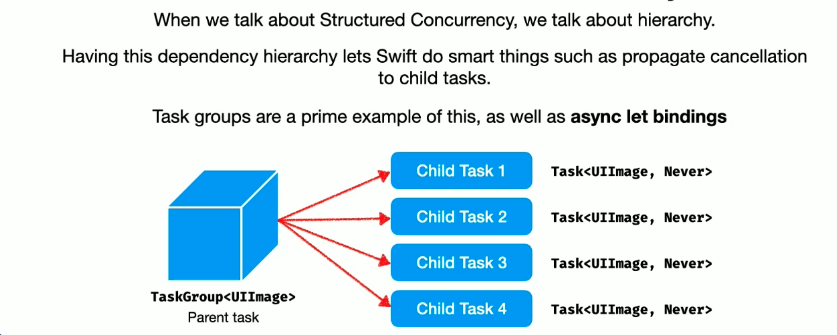
a task group as the name suggests, group together other child tasks in a hierarchical way (similar to procedure kit#group procedure)
await withTaskGroup(of: ...) {group in}
await withThrowingTaskGroup(of: ...) {group in}


// of is the type of each child task result. so that means child tasks are embedded to the type of the task group.

await withTaskGroup(ofL UIImage.self) {group in
for person in people {
 group.addTask(priority: person.isImportant ? .high : nil ) {await person.loadAvatar()}
 }

 var results = [UIImage].init()
 for await image in group {
   results.append(image)
 }
return results
}
this code will reach to the return line if all async code return data. if one of the task fails the group fails unless we handle it differently.
- you can also give priority base on the model object data
- results might return in any order, so its worth sorting or keeping track of the different task somehow.
Structured & unstructured Concurrency
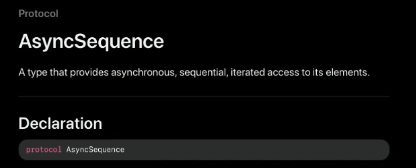
Async Sequences
up until now, we dealt with async functions that return a single result.
some times, we might have async work that will return multiple values : Sockets, Publishers and more...
AsyncSequence is similar ti regular Swift Sequence, except that every value is awaited asynchronously .
we saw it in the #Task groups code above .
for await image in group {
	result.append(image)
}
some methods async sequences is used
- URLSession bytes api
let (bytes, _) = try await URLSession.shared.bytes(for: URLRequest(url: largeCSV))

var peopple = [Person]()
try await line in bytes.line {
	people.append(Person(csvLine: line))
}
this code precesses the lines lazily, while the data transfer is ongoing.
- FileHandle api - instead of reading the entire file synchronously and than parse the lines we can do the following:
let handle = try FileHandle(forReadingFrom : localFile)
var people = [Person]()
for try await line in handle.bytes.lines {
	people.append(Person(csvLine: line))
}
this reads the lines one by one using the bytes api mentioned above.
what is exactly AsyncSequence?
its simply a protocol, we can conform it and make our own async sequence... check #conforming to AsyncSequence.
Actors
working with Actors is a very wide and deep topic, in this article i will only touch the basics.
if you like to see more , you should visit the WWDC relevant sessions about the subject
one of the most problematic things to get right when working async is Data Races. as you might already know, data races usually involved shared mutable state, when 2 or more threads trying to access that state at the same time, and at least one of these accesses is a write.
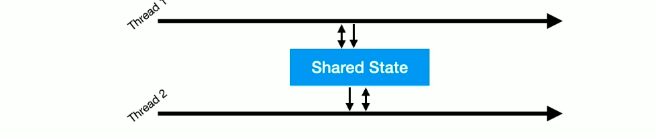
while value types can help a lot in data races, usually we solve them with more involved mechanisms:
- NSLock , NSRecursiveLock
- Serial Dispatch Queue
those mechanisms are very hard to get right...
Actor are reference type objects (like classes) that provide automatic synchronization and isolation for its state.
concurrent read/write races are very common in even the simplest of scenarios
when using actor and try to access data without await we will get this error:
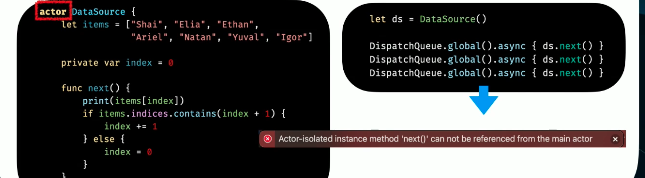
the way to fix this is to use a detached Task.. (we will soon explain the meaning of this error) functions in actors are automatically async
let ds = DataSource()
Task.detached {await ds.next()}
@MainActor
There is another special kind of actor called The Main Actor. In some way, it a representation of the main Thread.

you can annotate specific methods or even entire types with @MainActor, to make sure they always run on main thread:
@MainActor class SomeViewModel {
	func updateUI(){
		//this will run on main Thread
	}
	nonisolated func networking(){
		// nonisolated means the code will not be isolated for main thread only
	}
}
this is the actor concepts on the tip of the iceberg and there are much more to discuss when understanding the isolated context and actor "true story"
- @Sendable
- @globalActor
- @precconcurrency
- and much more...
Creating your own continuation
so far we talked about existing #async functions, but sometimes when we work with legacy we might want to wrap our closures api with async context and continuation.
we can do that with those build in function:
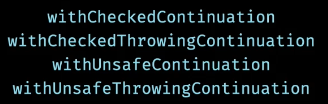
most of the time we will use the first two options, all do the same but the first help with runtime safety for continuation mechanism (you cant resume continuation more than once)
for example assume we have the following legacy load image function
func loadImage(completion: (Result<UIImage, Error>)->Void)
we can wrap is as an async function like so:
func loadImage() async throws -> UImage {
	try await withCheckedThrowingContinuation { continuation in
		switch result {
		  case .success(let image):
			  continuation.resume(returning: image)

		  case .failure(let error):
			  continuation.resume(throwing: error)
		}
	}
}
if you are using the swift Result type you can just send it like that: ``continuation.resume(with: result)
Creating our own Async Sequence
as mentioned before, #Async Sequences is simply a protocol.
luckily, we dont need to implement it ourself. we can use AsyncStream
AsyncStream
assuming we want to build a program to update stock changes base on a stock collection that we fetched prior, when there are no stocks in the collection case finished will be sent.
enum StockChange {
 case change(Stock)
 case finished

  func monitorStocks(stockChange: (StockChange) -> Void){....}
}
with AsyncStream we can implement this behavior easily :
func monitorStocks() -> AsyncStream<Stock> {
	AsyncStream<Stock> {continuation in
	   monitorStocks { change in
		 switch change {
		   case .change (let stock):
		    continuation.yield(stock)
		   case .finished:
			   continuation.finish()
		 }
	   }
	}
}

// implementation of the stream
Task {
	for await stock in monitorStocks() {
	  print("current stock:" \(stock))
	}
}
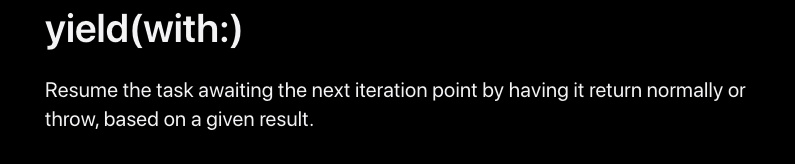
notice we use yield this time because we have a sequence of objects we want to stream out (and resume can occurs only once)
Objective-C Interoperability
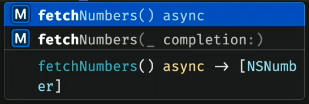
for Objective-C the swift Compiler automatically generated async versions of block-based methods:
-(void)fetchNumbers:(void(^)(NSArray<NSNumber *>*>))completion;
the swift runtime will create the following:
you can even use preprocessor macros to generate a different method names...
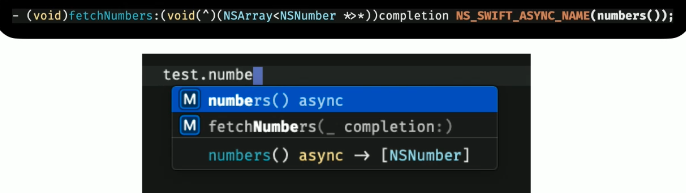
why is this important?
well that just means that most of apple code that have completion handlers gets free bridging to async/await. (-:
SwiftUI
To execute async functions from within your SwiftUI code, you can simply use the new .task modifier (IOS 15+)
IOS 15+
this will run on the view onAppear life cycle method behind the scene
struct MyView : View {
	@State var numbers = [Int]()

	var body: some View {
		Text("\(numbers.count) numbers")
		 .task {
			 self.numbers = await fetchNumbers
		 }
	}
}
IOS 13+
struct MyView : View {
	@State var numbers = [Int]()

	var body: some View {
		Text("\(numbers.count) numbers")
		 .OnAppear {
		   Task { @MainActor in
		      self.numbers = await fetchNumbers()
		   }
		 }

	}
}
should notice ios 15 code help with cancellation and much more the other code does not, how ever in most cases both will generate same result.
Combine and Async/Await
we saw #Async Sequences which is very similar to Combine#Publisher.
we can use a publisher this way using the values property:
combine & sink
numbers
.map {$0*2}
.prefix(3)
.dropFirst()
.sink(
  recieveCompletion: {_ in print("Done!")},
  receiveValue: {print("Value \($0)")}
).store(in: &subscription)
Combine & async/await:
let publishers = numbers
.map{ $0*2 }
.prefix(3)
.dropFirst()

for await number in publisher.values {
  print("Value \(number)")
}

print("Done!")
values - turns the publisher into an async sequence
swift-async-algorithem
Combine had all those awesome operators we all grew to love. but how do we use them on async await?
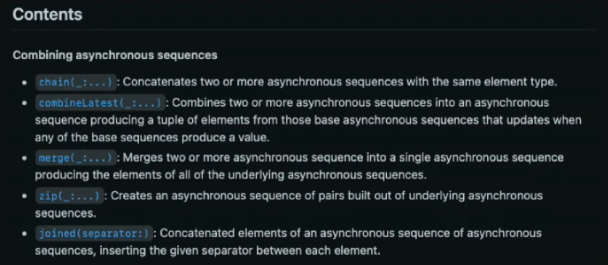
Apple seems to be shifting its focus heavily towards async/await, as evident by their latest release of swift-async-algorithem a set of combine-like operators for #Async Sequences.