overview of SQL
Syntax
SQL statement
an SQL statement begins with a keyword and end with a ;
SELECT * FROM table;
and SQL statement are not case sensitive so SELECT and select are the same.
depends on the operating system the table name itself can also be case insensitive, but that not guaranteed. Therefore it is a convention to treat everything as case sensitive.
comments are created using -- this is a comment
(multi-lines comments are the same as in C syntax).
SQL clauses
a statement might have one or more clauses, depending on the syntax of the statement. for example:
SELECT * FROM Album WHERE Label = 'Columbia'
each clause refers to a different part of our database. the FROM refers to a table and the WHERE specifies a condition that must be satisfied for each row of the table.
SQL functions
you can use function to perform specific operations on data. for example:
SELECT COUNT(*) FROM Album WHERE Label = `Columbia`
for example the COUNT will return the numbers of rows matching the condition of WHERE clause.
SQL expressions
an expression is used in SQL to derive values from data, for example:
SELECT Name, Population/ 1000000 AS PopMM
	FROM Country
	WHERE Population >= 1000000
	ORDER BY Population DESC
will return all the populations with value larger than 1M , but it will return them as a their value divided by 1M.
Database Organization
the purpose of the database is to organized your data and to make it available in convenient forms.
MySQL is a relational database which means the data is organized in two dimensional tables comprised of rows and columns.
a relational database has tables, the amount of those is determine by the database creator itself.
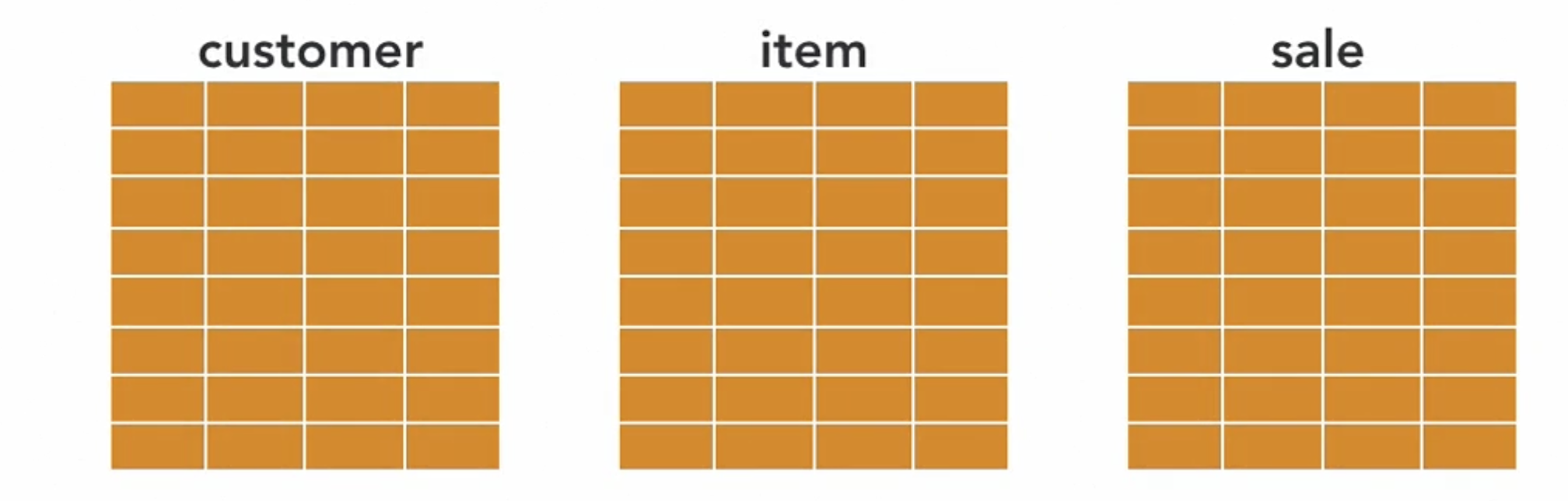
a table has rows and cols by the amount of data the table have and by the data itself you use to represent an entity/record.
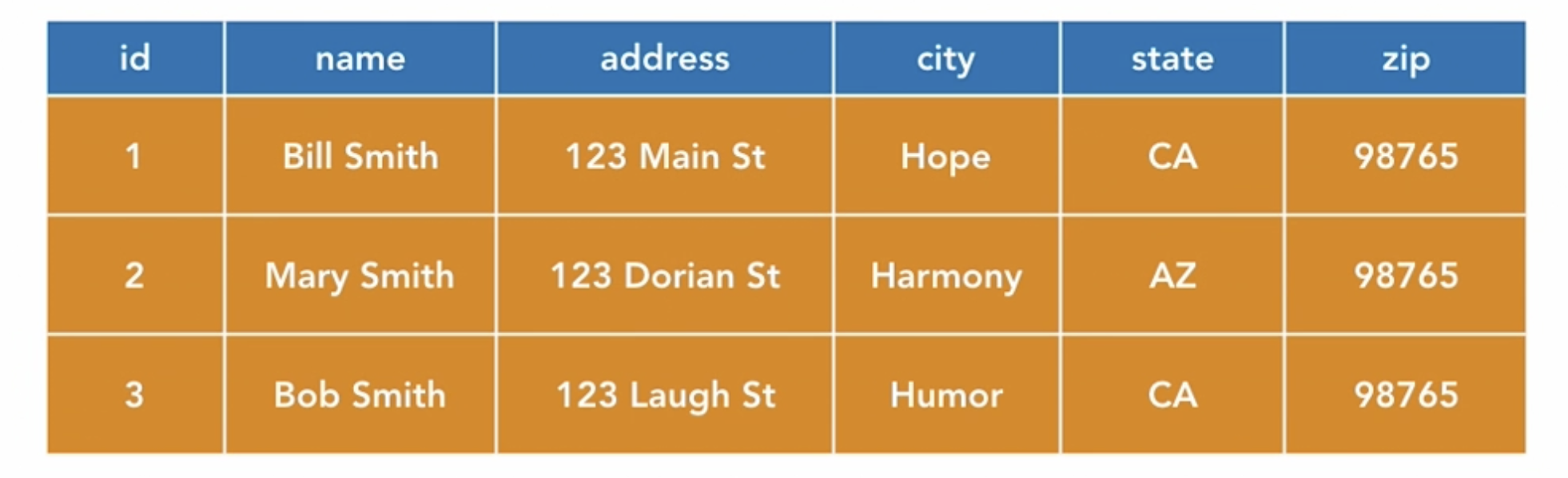
the second row is for the record Mary Smith. Each col represent a variable of the record.
Each row in a table has a unique key (in this example its the id)
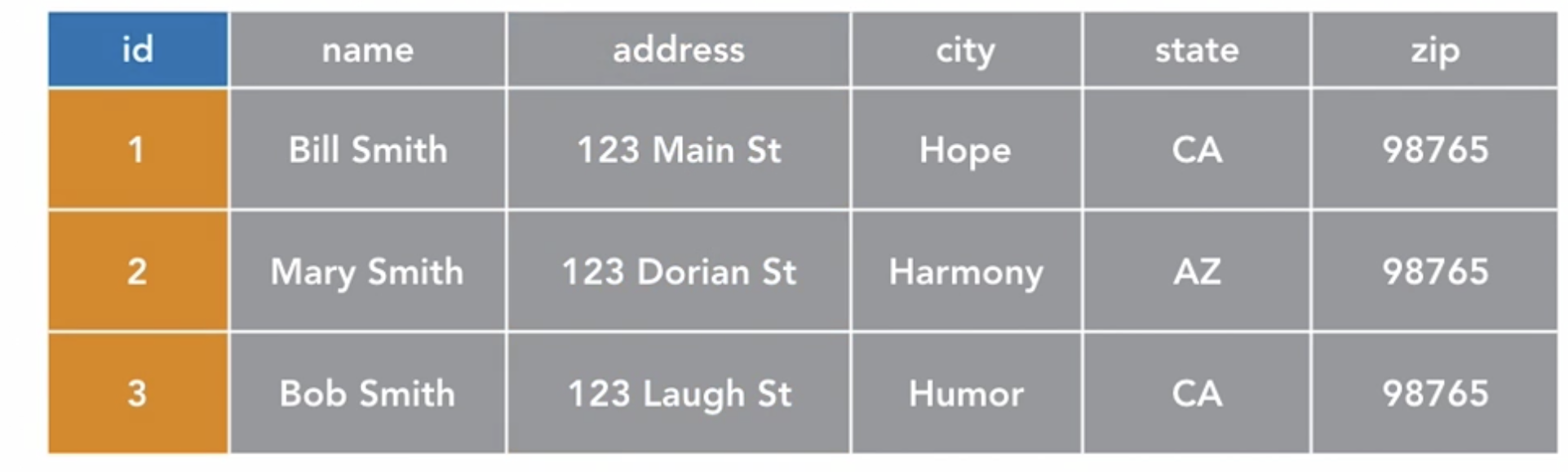
the tables unique key may or may not correspond with the row number.
the unique key can be hidden but the table must have one. When a col is used as a unique key, it is often call the primary key.
it simply mean that the col is the unique key (just like the id row).
remember- there is always a unique key for a table.
tables are related by keys
the tables keys are used to create relationships between tables.
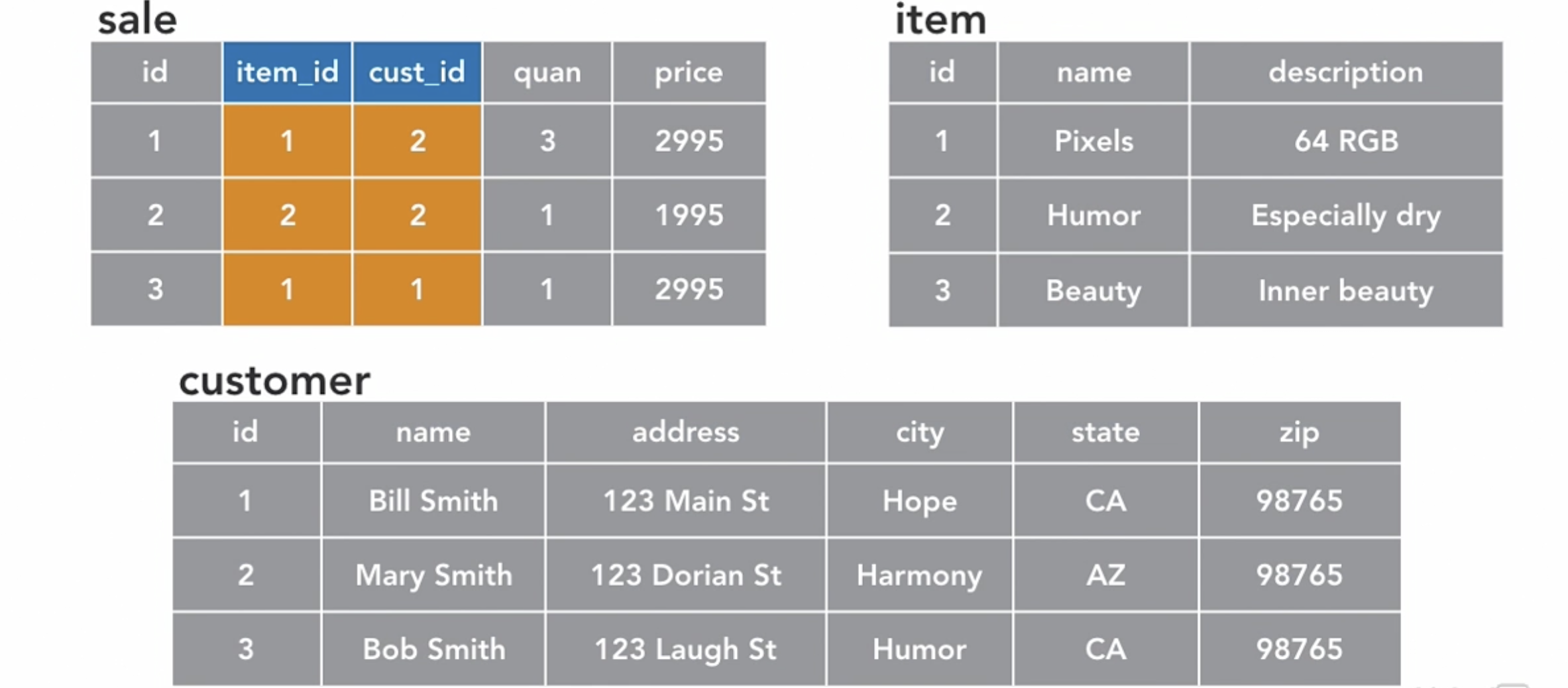
the sale tables have what is called Foreign key because it refer to the keys of other tables.
This ability allows us to use Joint Queries- to treat rows in several tables as a joined unit.
MySQL vs SQL
- SQL is the language we use to "talk" with the databases. it consist of :
- DDL - Data Definition Language.
- DML - Data Manipulation Language.
- DCL - Data Control Language (user permission)
- TCL – Transaction Control Language
- DQL – Data Query Language
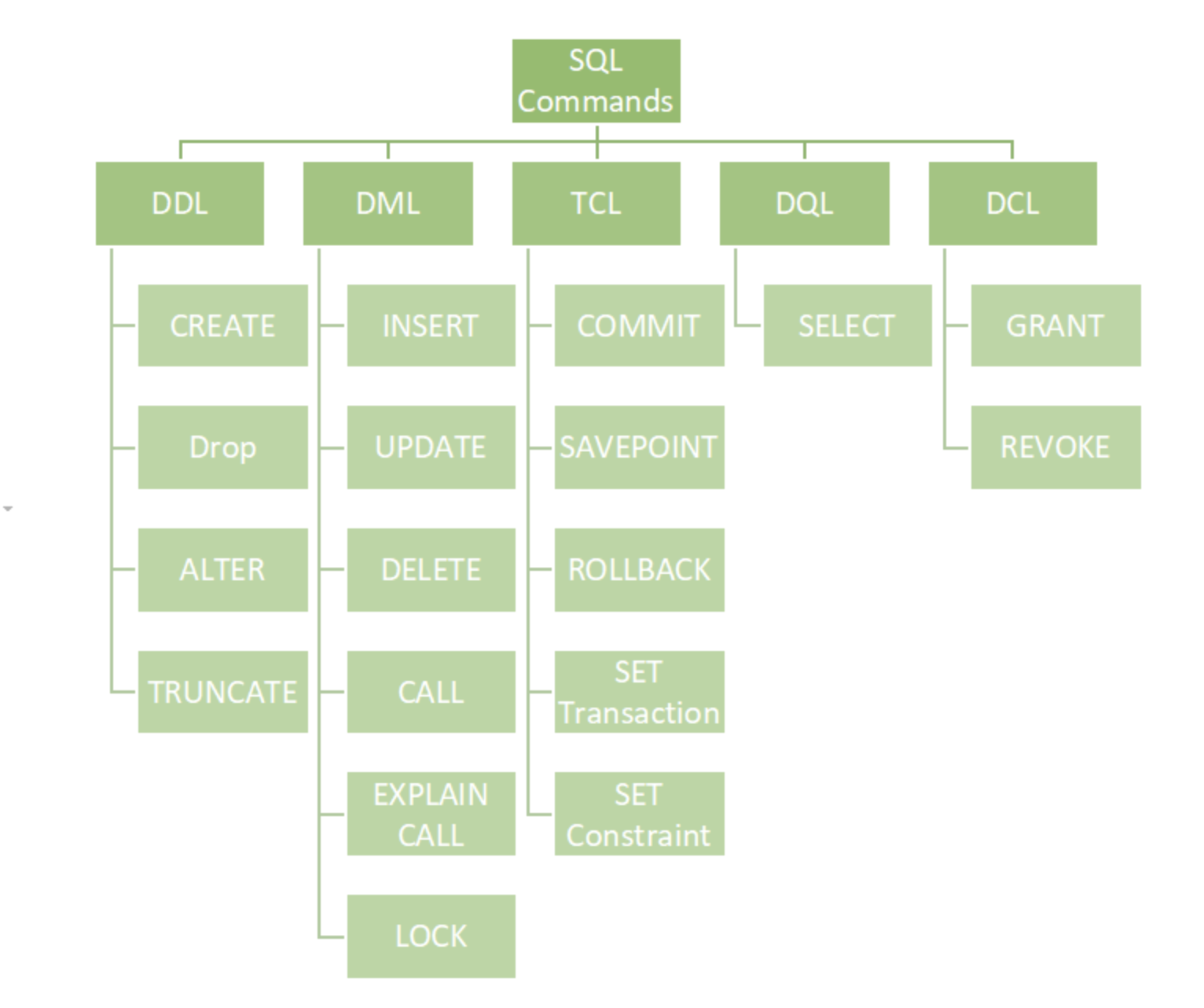
- working with MySQL just means you manage a relational data base using SQL language. There are many implementations of a relational database using SQL : MYSQL , SQLite, Oracle, PostgreSQL ....
MySQL Data Types
data types is how the data is being store and represented inside of the database.
MySql support some fundamental types:
- Numeric
- String
- Date and Time
- Specialty types- boolean , enumeration and sets.
it is important to be familiar with those data types since MySQL imposes hard limits on the number of cols per tables and bytes per row:
- max 4096 cols per table
- max 65,535 bytes per row
use theSHOW CREATE TABLE table_nameto see the table scheme and data types.
Numeric
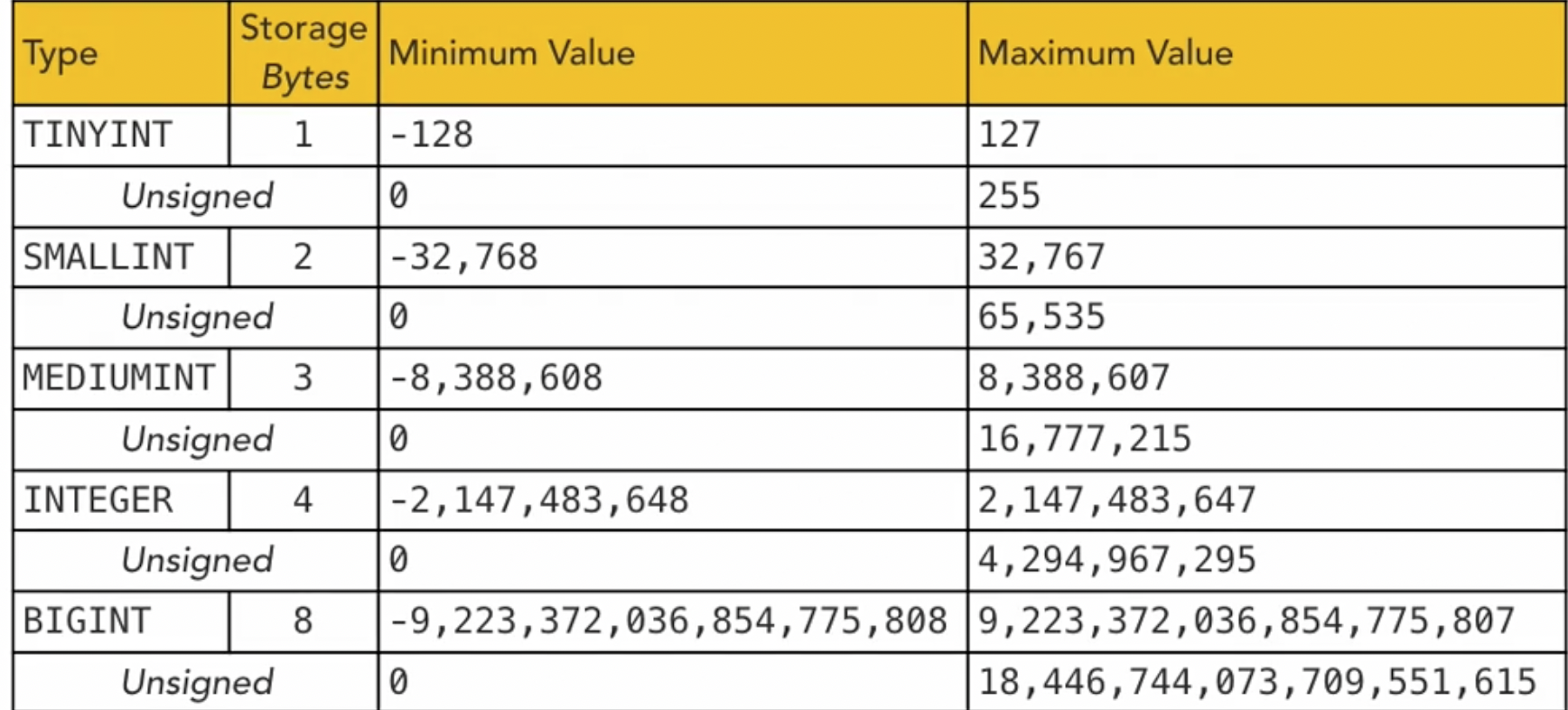
those can be divided to different types
- Integer
- Fixed point - The
DECIMALandNUMERICtypes store exact numeric data values. These types are used when it is important to
theDECIMAL(precision,scale)is used for fixed precision values. it takes 2 params, the precision which the specify the amount of digits that will be stored and the scale is where the floating point should be pointed.
example :DECIMAL(9,2)for
NUMERICis an alias forDECIMAL.
writing DECIMAL without any params means DECIAML(10,0).
preserve exact precision, for example with monetary data.
- Floating point type- for
numbers.
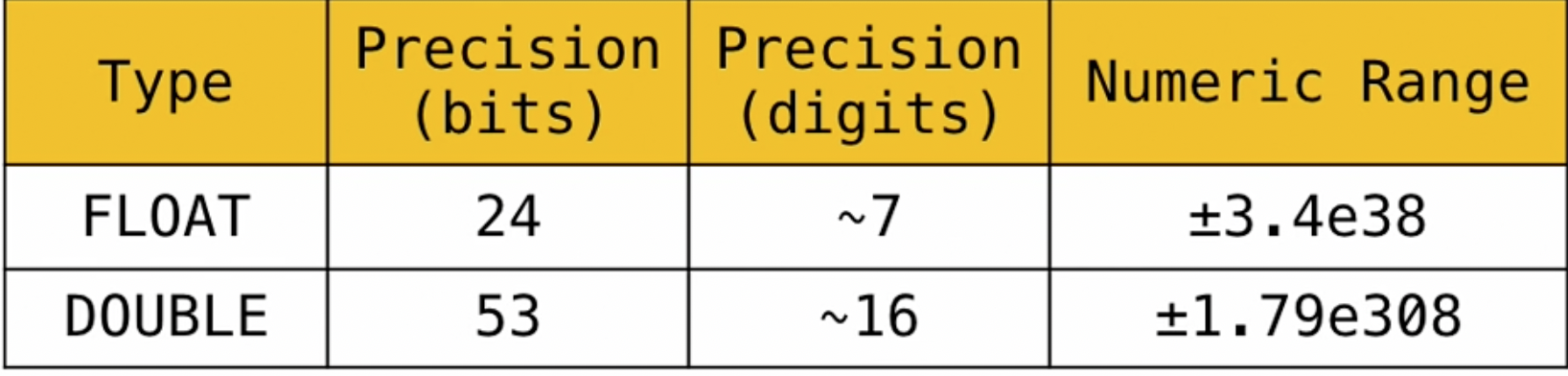
REALis an alias forFLOAT
the important this to remember is that we pay for accuracy but get more variable length when working with Floating point instead of fixed point.
Strings
- fixed length strings
CHAR - variable length strings -
VARCHAR - binary strings
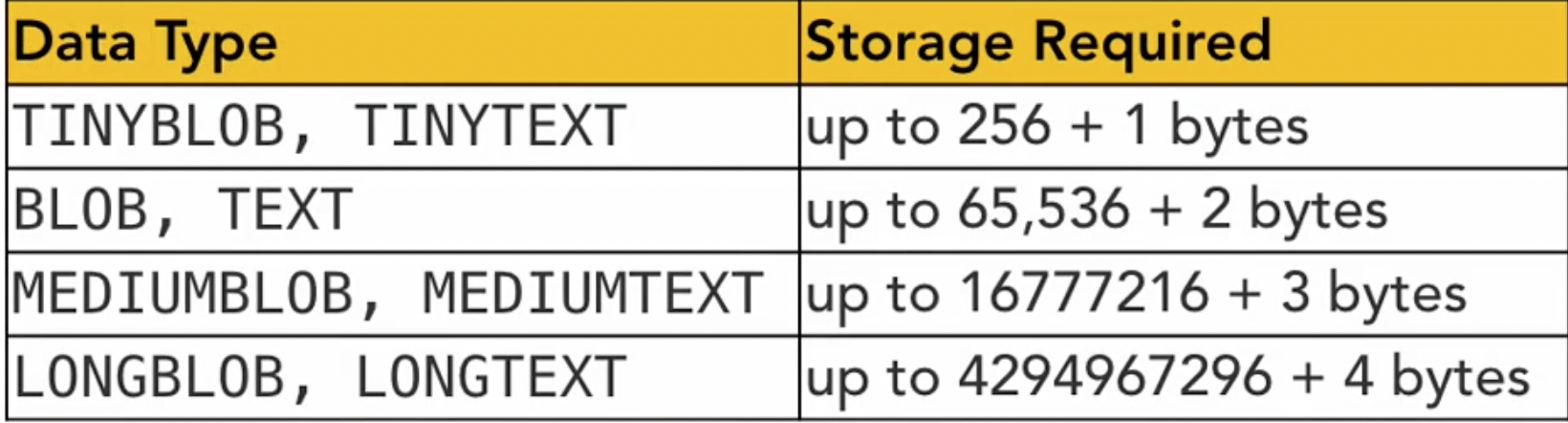
- Large object storage for images and large data.
character strings come in two varieties:
CHAR(length) always create a string for this fixed length, it will add spaces if you create a string with lower length. when retrieving the string all those padded spaces are removed first.
VARCHAR(length) is a variable length string. it is an upper bounds string which means you can use up to length characters.
this comes with a storage bytes because it also use 1 byte for length.
BINARY(lenght)
VARBINARY(length)
is the same just for binary strings and its being padded with 0 and not spaced.
large object storage
for more functions of string see: MySQL String functions
Date time
- Timestamp
- DateTime
MySQL support some variations of Date time types..
the NOW() will return the current day time in the following format YYYY-MM-DD hh:mm:ss. This is the standard sql formal.
time zone variables :
- system_time_zone- the time zone for the particular system.
- time_zone - which time zone sql should use - the default is SYSTEM.
SET time_zone - +00:00 will set the time zone to UTC. and you can change the time zone this way to different value.
you can ignore the time zone to get use TIME_STAMP variable for example UTC_TIMESTAMP.
use the TIMESTAMP variable in scheme to update automatically whenever you create or update a the record, however, because of limitation of how the timestamp work, you should not use it.
instead: you should use the DATETIME value. for example:
stamp DATETIME DEFAULT CURRENT_TIMESTAMP ON UPDATE CURRENT_TIMESTAMP
Enumeration
- ENUM - single value from list.
TheENUMtype has these advantages:
1) Compact data storage in situations where a column has a limited set of possible values. The strings you specify as input values are automatically encoded as numbers.
2) Readable queries and output. The numbers are translated back to the corresponding strings in query results.
An enumeration value must be a quoted string literal. For example, you can create a table with an ENUM column like this:
CREATE TABLE shirts ( name VARCHAR(40),
					 size ENUM('x-small', 'small', 'medium', 'large', 'x-large')
					 );
Each enumeration value has an index:
1) The elements listed in the column specification are assigned index numbers, beginning with 1.
2) The index value of the empty string error value is 0. This means that you can use the following SELECT statement to find rows into which invalid ENUM values were assigned:
For example, a column specified as ENUM('Mercury', 'Venus', 'Earth') can have any of the values shown here. The index of each value is also shown.
| value | index |
|---|---|
| NULL | NULL |
| '' | 0 |
| 'Mercury' | 1 |
| 'Venus' | 2 |
| 'Earth' | 3 |
- SET - set of several values from a list
ASETis a string object that can have zero or more values, each of which must be chosen from a list of permitted values specified when the table is created.SETcolumn values that consist of multiple set members are specified with members separated by commas (,). A consequence of this is thatSETmember values should not themselves contain commas.
For example, a column specified as SET('one', 'two') NOT NULL can have any of these values:
``
`one`
`two`
`one,two`
A SET column can have a maximum of 64 distinct members.
- Trailing spaces are automatically deleted from
SETmember values in the table definition when a table is created. - If a number is stored into a
SETcolumn, the bits that are set in the binary representation of the number determine the set members in the column value. For a column specified asSET('a','b','c','d'), the members have the following decimal and binary values.
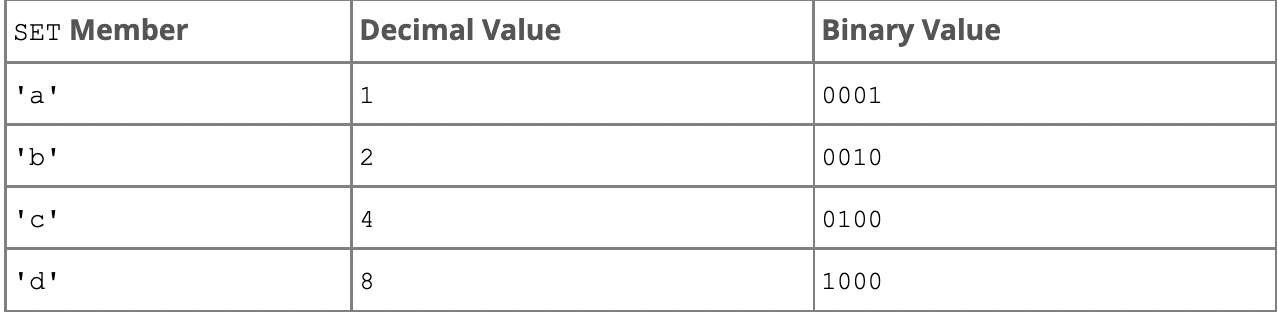
If you assign a value of 9 to this column, that is 1001 in binary, so the first and fourth SET value members 'a' and 'd' are selected and the resulting value is 'a,d'.
- there are no duplicates for a SET even if you manually insert it with duplicates.
INSERT INTO myset (col) VALUES
-> ('a,d'), ('d,a'), ('a,d,a'), ('a,d,d'), ('d,a,d');
all the values appear as a,d when retrieved.
MySQL comparison operators
MySQL provide several comparison operators that can be used on both numbers and strings.
Logical Operators
for example SELECT 0 = 1; will return 0 since numbers in SQL can be treated like flags (exactly the same as C).
this will work if we treat on of the args as string for example SELECT 0.1 < 0
in general you can do any boolean logical operator just like in any other programming language..
((9 > 7) AND (12 < 7)) OR (flag IS NOT TRUE) for example.
- you can also check if element is in a set for example :
SELECT 7 IN (1,2,3,4)
Arithmetical operators
a) DIV, / -- division in 0 will return NULL
b) MOD , %
c)
d)
e)
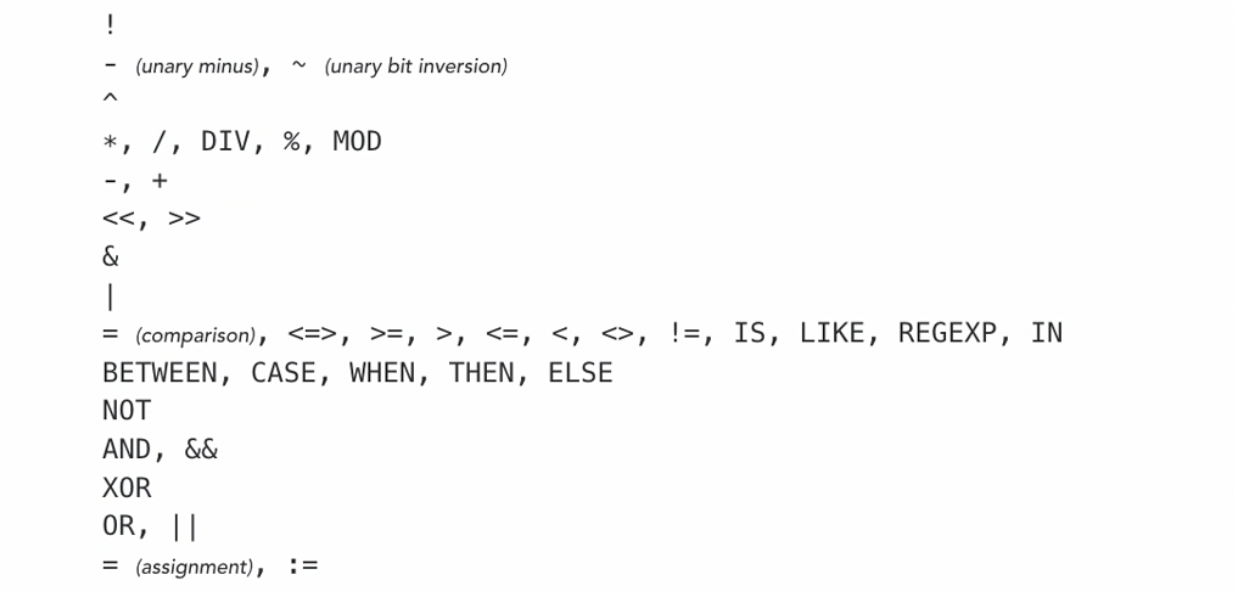
MySQL uses PEDMAS priorities when calculating arithmetics expressions:
- parentheses
- exponents
- division
- multiplication
- addition
- subtraction
this is the operator precedence table for sql operators
CASE
The CASE statement goes through conditions and return a value when the first condition is met (like an IF-THEN-ELSE statement). So, once a condition is true, it will stop reading and return the result.
CASE
    WHEN _condition1_ THEN _result1_
    WHEN _condition2_ THEN _result2_
    WHEN _conditionN_ THEN _resultN_
    ELSE _result_
END;
you can use the CASE in a bit of a different way as well by testing again the WHEN clause and not a condition for example
CASE a WHEN 1 THEN ...
IF
The IF() function returns a value if a condition is TRUE, or another value if a condition is FALSE.
SELECT IF(500<1000, 5, 10);
SELECT IF(b>0, 'true', 'false')
DDL
Create Delete and Alter a Table
- The
CREATE TABLEstatement is used to create a new table in a database.
CREATE TABLE _table_name_ (
    _column1 datatype_,
    _column2 datatype_,
    _column3 datatype_,
   ....
);
it will create the table according to the provided the params. the "SCHEME" of the table it the data in the ()
don't put , in the last column.
- The
DROP TABLEstatement is used to drop an existing table in a database.DROP TABLE _table_name_; - The
TRUNCATE TABLEstatement is used to delete the data inside a table, but not the table itself. - The
ALTER TABLEstatement is used to add, delete, or modify columns in an existing table. TheALTER TABLEstatement is also used to add and drop various constraints on an existing table.
ALTER TABLE _table_name_
ADD _column_name datatype_;
if you try to create an existing table or drop a table that not exists you will get an error, to resolve this use the
IF EXISTSclause.
The Null value
- A field with a NULL value is a field with no value.
- If a field in a table is optional , it is possible to insert a new record or update a record without adding a value to this field. Then, the field will be saved with a NULL value.
- It is not possible to test for NULL values with comparison operators, such as =, <, or <>. We will have to use the
IS NULLandIS NOT NULLoperators instead. - you can create a table with a
NOT NULLconstraint which prevents rows to be inserted without a value.
CREATE TABLE test(
a INTEGER NOT NULL
b TEXT NOT NULL
c TEXT
)
now if you try to insert NULL an error will occur.
Constraining columns
Constraints can be specified when the table is created with the CREATE TABLE statement, or after the table is created with the ALTER TABLE statement. SQL constraints are used to specify rules for the data in a table.
- Constraints are used to limit the type of data that can go into a table. This ensures the accuracy and reliability of the data in the table. If there is any violation between the constraint and the data action, the action is aborted.
- Constraints can be column level or table level. Column level constraints apply to a column, and table level constraints apply to the whole table.
The following constraints are commonly used in SQL:
NOT NULL- Ensures that a column cannot have a NULL value.UNIQUE- Ensures that all values in a column are different.PRIMARY KEY- A combination of aNOT NULLandUNIQUE. Uniquely identifies each row in a table.FOREIGN KEY- Prevents actions that would destroy links between tables.CHECK- Ensures that the values in a column satisfies a specific condition.DEFAULT- Sets a default value for a column if no value is specified.CREATE INDEX- Used to create and retrieve data from the database very quickly
Primary Key
primary key is a field (or set of fields) in a table that uniquely identifies each row in the table. The primary key is used to enforce the integrity of the data and to establish relationships with other tables in the database.
A primary key must meet the following requirements:
- It must contain a unique value for each row in the table. No two rows in the table can have the same primary key value.
- It cannot contain null values. Each row in the table must have a non-null primary key value.
There are several benefits to using a primary key in a database:
-
Data integrity: The primary key helps ensure the integrity of the data by preventing duplicate rows and ensuring that each row in the table has a unique identifier.
-
Data relationships: The primary key is used to establish relationships with other tables in the database. For example, if you have a table of employees and a table of departments, you can use the primary key of the departments table as a foreign key in the employees table to link each employee to the department they work in.
-
Data consistency: The primary key helps maintain the consistency of the data by ensuring that each row in the table has a unique identifier. This can make it easier to update and query the data, since you can use the primary key value to locate specific rows in the table.
Foreign Key
In SQL, a foreign key is a field (or set of fields) in a table that refers to the primary key of another table. Foreign keys are used to establish and enforce relationships between tables in a database.
For example, consider a database that stores information about employees and departments. The employees table might have a foreign key called "department_id" that refers to the primary key of the departments table. This allows you to link an employee to the department they work in and ensures that the department_id value in the employees table is always valid and corresponds to a department in the departments table.
There are several benefits to using foreign keys in a database:
-
Data integrity: Foreign keys help ensure the integrity of the data by preventing invalid data from being entered into the database. For example, if you try to insert an employee with a department_id value that does not exist in the departments table, the database will reject the insert operation because the foreign key constraint has been violated.
-
Data consistency: Foreign keys help maintain the consistency of the data by ensuring that related data is stored in different tables. This can make it easier to update and query the data, since you only need to update or query a single table instead of multiple tables.
-
Data relationships: Foreign keys help define the relationships between different tables in the database, making it easier to understand how the data is related and how it can be queried.
To create a foreign key in SQL, you can use the FOREIGN KEY constraint when creating or modifying a table. Here is an example of how to create a foreign key in SQL:
CREATE TABLE employees (
  employee_id INT PRIMARY KEY,
  name VARCHAR(255),
  department_id INT,
  FOREIGN KEY (department_id) REFERENCES departments(department_id)
);
General Assertion
In SQL, an assertion is a condition that must be true for the database to remain in a valid state. Assertions are used to enforce business rules and constraints on the data in a database.
An assertion is created using the CREATE ASSERTION statement and consists of a boolean expression that must evaluate to true. If the expression evaluates to false, the database will raise an error and the transaction will be rolled back.
For example, you might create an assertion to ensure that the salary of an employee is always greater than zero:
CREATE ASSERTION salary_greater_than_zero CHECK (salary > 0);
You can also specify the conditions under which an assertion is checked using the CHECK OPTION clause. For example, you might create an assertion that is only checked when data is inserted or updated:
CREATE ASSERTION salary_greater_than_zero CHECK (salary > 0) WITH CHECK OPTION;
In this case, the assertion will only be checked when new data is inserted into the table or when existing data is updated.
It's worth noting that assertions are not supported by all database management systems. Some systems, such as MySQL, do not have a concept of assertions. In these systems, you can use #SQL-triggers or stored procedures to enforce constraints on the data.
Changing a schema
use ALTER SCHEMA to change a table scheme after it was created.
for example we can add a row with the following command
ALTER TABLE test ADD e TEXT DEFAULT 'col_new';
DML
Selecting Queries
SELECT is used for queries that will return a value or a set of values. this command is used to display result of any query.
for example SELECT 'Hello, World'; will return the literal string (the query does not have to come from the database).
SELECT * FROM Country; - will show the Country table and its rows.
SELECT * FROM Coutnry ORDER By Name; will return a new result set sorted according to the Name columns.
notice that * is like a wild card of files it means that we should return every row from some sort of table.
Selecting Columns:
we can specify a column name or many cols.
SELECT Name, LifeExpectancy From County ORDER BY Name; will send 2 columns from the table as a result.
this process it called PROJECTION , when you show only part of the cols available..
-
you can alias a col name by using the
ASkey word. for example :SELECT Name, LifeExpectancy AS 'Life Expectancy' From County ORDER BY Name;will alias the col name with the string we specify. -
use the
,char to choose multiple cols at once. -
The following SQL statement creates an alias named "Address" that combine four columns (Address, PostalCode, City and Country):
SELECT CustomerName, Address + ', ' + PostalCode + ' ' + City + ', ' + Country AS Address FROM Customers; -
Alias can be used to make SQL queries shorter, the following SQL statement selects all the orders from the customer with CustomerID=4 (Around the Horn). We use the "Customers" and "Orders" tables, and give them the table aliases of "c" and "o" respectively:
SELECT o.OrderID, o.OrderDate, c.CustomerName
FROM Customers AS c, Orders AS o
WHERE c.CustomerName='Around the Horn' AND c.CustomerID=o.CustomerID;
The following SQL statement is the same as above, but without aliases:
SELECT Orders.OrderID, Orders.OrderDate, Customers.CustomerName
FROM Customers, Orders
WHERE Customers.CustomerName='Around the Horn' AND Customers.CustomerID=Orders.CustomerID;
- by using the
LIMITwe can get only the "first"results we want. SELECT * From County ORDER BY Name LIMIT 5;will return only the first 5 rows.LIMITalso get an offset so if we want theresults for example rows 5 to 10, we can use LIMIT 5, 5;the first 5 is for the offset and the second is for how many results. The default offset is of course. - notice that you can perform the
SELECT ... FROMon multiple tables,SELECT col1,col2,.... FROM table1, table2,....
COUNT:
- we can use functions in the Select Query for example
SELECT COUNT(*) From County;will return the count of all the rows of the table (because we wrote *). - we can return the
COUNTof a specific query likeSELECT COUNT(*) FROM Country WHERE Population >= 10000000 - we can return the
COUNTof the rows which have value for a specific col by replacingCOUNT(*)withCOUNT(COL1,COL2...)
Insert Update and Delete Data
Insert
you can use INSERT INTO to add a new row to the table for example:
user the INSERT INTO customer (name, address, city, state) VALUES ('Saar Azari, 23 ,Tel-Aviv, Israel');
using
DEFAULT VALUESwill insert the default value for the variable (it will mostly be NULL)
you can add rows from different tables if the data type matches for example : assume that
a INTEGER, b TEXT, c TEXTis the scheme for a table name test, you can insert values using some predicate for example :
INSERT INTO test (a,b,c) SELECT id, name , description from item;
Update
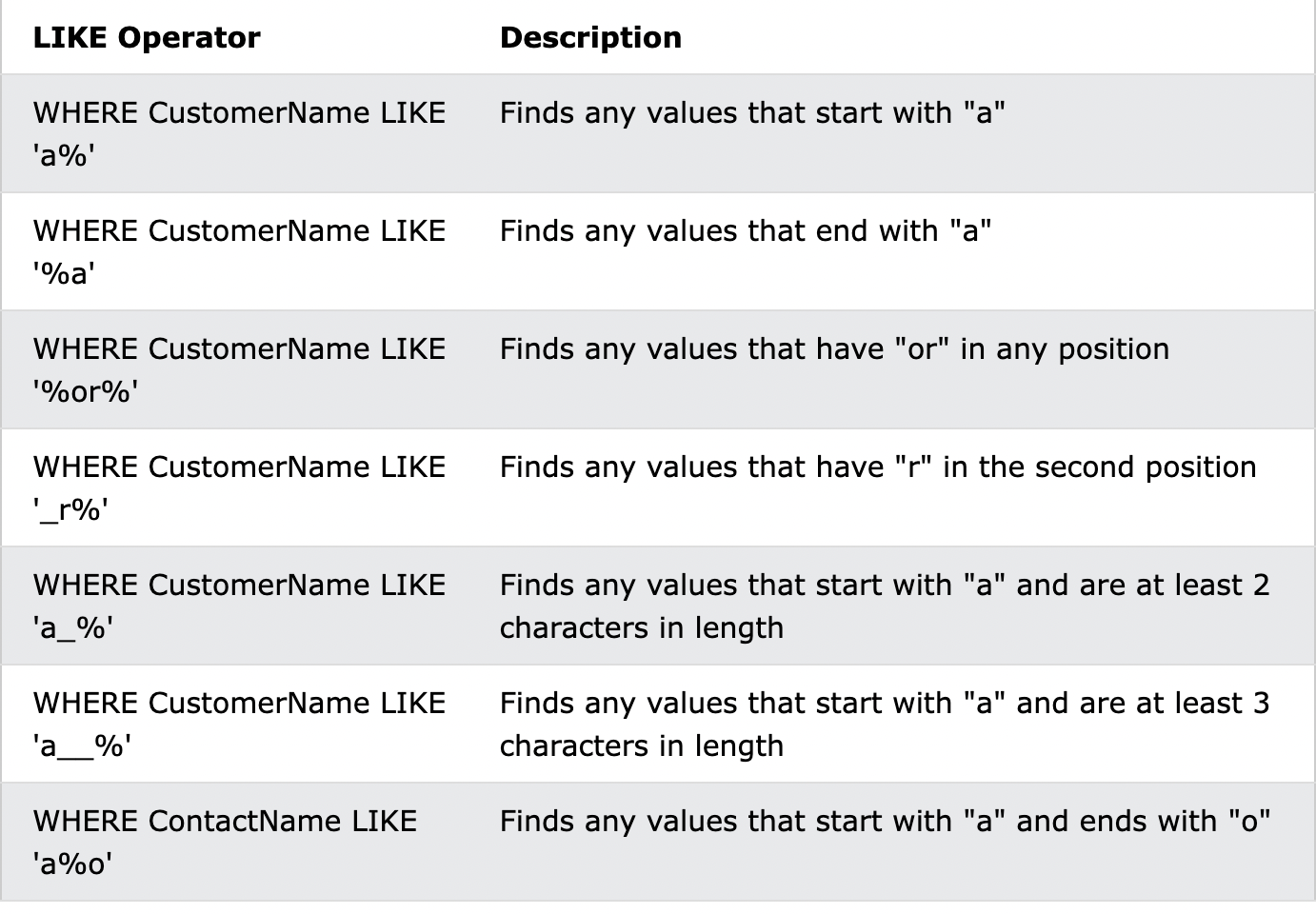
LIKEoperator is used in aWHEREclause to search for a specific pattern in a column.- The percent sign (%) represents zero, one, or multiple characters
- The underscore sign (
_) represents one, single character
SELECT * FROM customer WHERE name LIKE 'Saar%'will return all the rows in customer table which start with "Saar".
- you can use the
Updateto set the value of a certain row in the table. for example:
UPDATE customer SET address = '123 pth' Where name LIKE 'Saar%';
will set the address cols for rows that match the above predicate. - you can update a value to be
NULLwhich will remove the value to be empty in the specific col.
Delete
you can delete a row base on a query using the DELETE operator. for example:
DELETE FROM test WHERE a=1;
- if you wont put a query it will delete all the rows.
- use
DELETE TABLE table_name;to delete the entire table.
Removing Duplicates
use the SELECT DISTINCT to remove all duplicates that the query will return.
Inside a table, a column often contains many duplicate values and sometimes you only want to list the different (distinct) values.
SELECT DISTINCT _column1_, _column2, ..._
FROM _table_name_;
conditional expressions
Conditional Expressions in SQL are used to evaluate conditions based on the input values. Conditional Expressions that are used in SQL are CASE, DECODE, COALESCE, NULLIF, IFNULL, IN. Conditional Expressions works on the conditions.
CASE WHEN condition1 THEN result1
WHEN condition2 THEN result2
WHEN conditionN THEN resultN
ELSE result END;
you can filter data base on conditional expression for example
SELECT
	CASE WHEN a THEN 'true' ELSE 'false' END as boolA -- first version check 'a' value itself.
	CASE a WHEN 1 THEN 'true' ELSE 'false' END as boolA --second version  check a predicate on a.
JOIN
A JOIN clause is used to combine rows from two or more tables, based on a related column between them. lets examine the next query
SELECT a.artist AS Artist, a.title AS Title, t.track_number AS 'Track Num', t.title AS Track, t.duration AS Seconds
FROM album AS a
JOIN track AS t ON a.id = t.album_id
ORDER BY a.artist, a.title, t.track_number;
here we select select some rows and alias them from two tables - the album and track tables, and JOIN ON where the id of the album is the same as the album id of the track. The last thing we do is to order by the above variables in increasing order and by the order of the variables. we can set it to be order in decreasing order using the DESC keyword.
as ASCII order will need the
ASCkeyword
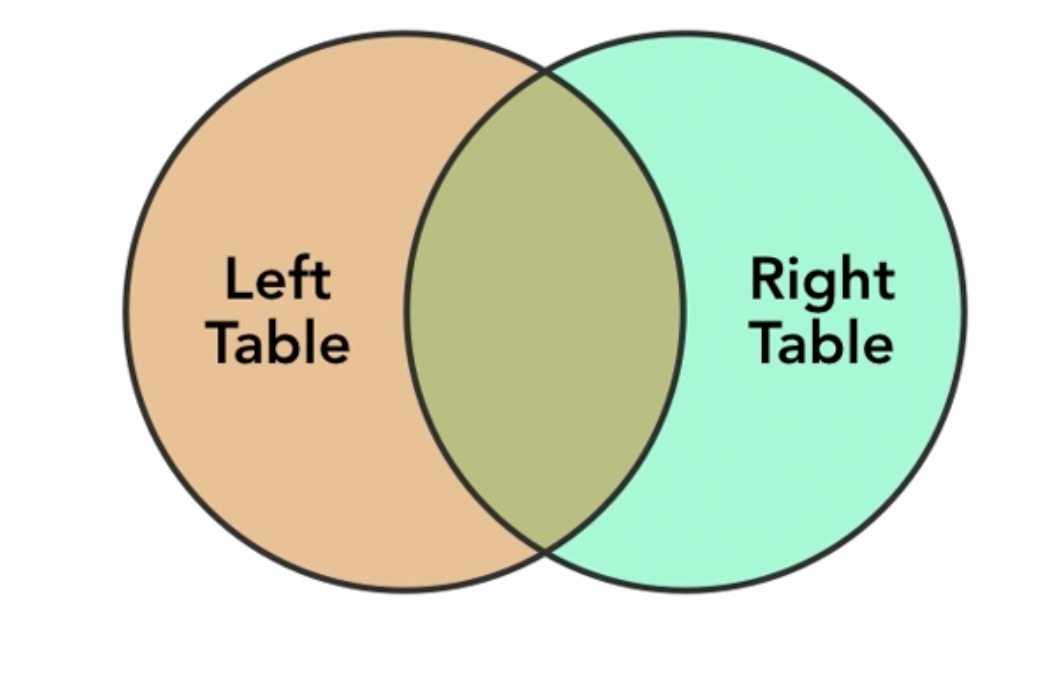
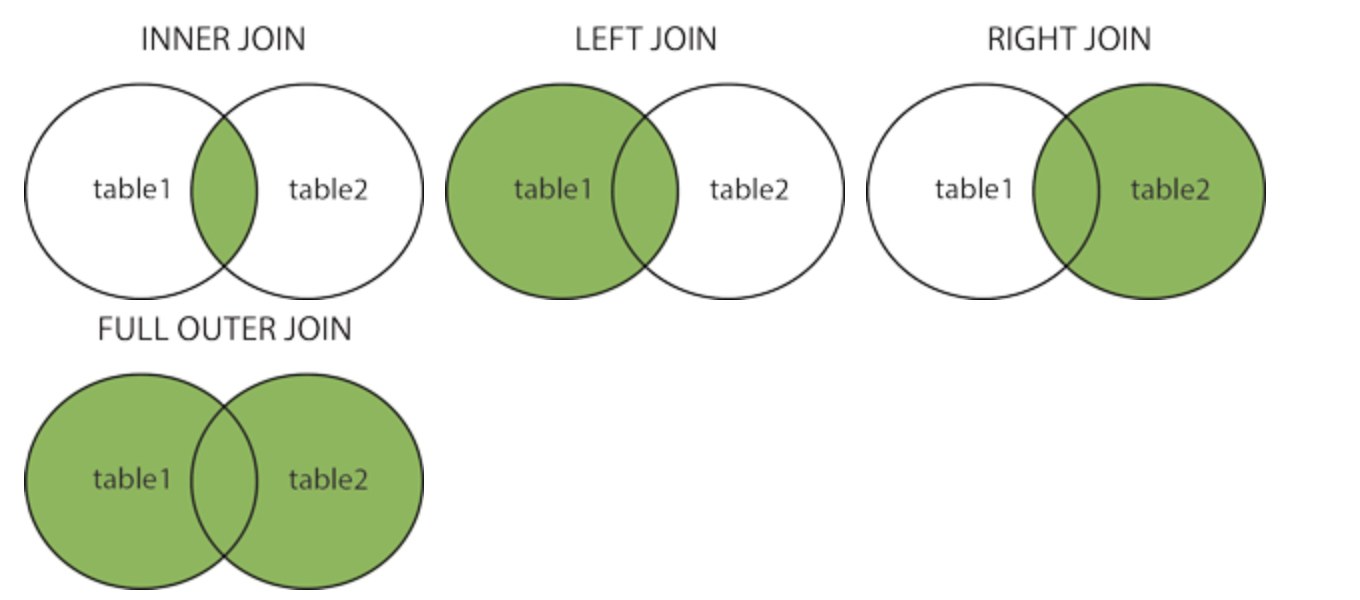
we can visualize a joined query as a Venn diagram, where each table is one of the shapes, and the intersection of the shapes are the rows where the condition met on both tables.
type of JOIN
- INNER JOIN - the default, return rows from both tables where join condition is met.
- LEFT OUTER JOIN return the inner join result and all the results from the left table where condition is not met.
- RIGHT OUTER JOIN includes all the rows from the table on the right where the table are not met.
- FULL OUTER JOIN
Relating multiple tables
a single customer may but many items, and an item may be purchased by many customers. This is called a many to many relationship between those tables.
for example let examine the following query:
SELECT c.name AS Cust, c.zip, i.name AS Item, i.description, s.quantitiy as Quan, s.price AS Price
	FROM sale AS s
	JOIN item AS i ON s.item_id = i.id
	JOIN customer AS c ON s.customer_id = c.id
	ORDER BY Cust, Item
the result for some database will return the following

the sale table is called a junction table. Junction tables are used when dealing with many-to-many relationships in a SQL database.
in this example the junction table is the sale table because its connect between an item and a customer.
we can do another example
CREATE TABLE Students
(
    StudentID int IDENTITY(1,1) PRIMARY KEY,
    StudentName nchar(50) NOT NULL
)

CREATE TABLE Classrooms
(
    ClassroomID int IDENTITY(1,1) PRIMARY KEY,
    RoomNumber int NOT NULL
)
Now that we have our two tables created we need to create the junction table that will link them together. The junction table is created by using the primary key from the Classrooms and Students tables.
CREATE TABLE StudentClassroom
(
    StudentID int NOT NULL,
    ClassroomID int NOT NULL,
    CONSTRAINT PK_StudentClassroom PRIMARY KEY
    (
        StudentID,
        ClassroomID
    ),
    FOREIGN KEY (StudentID) REFERENCES Students (StudentID),
    FOREIGN KEY (ClassroomID) REFERENCES Classrooms (ClassroomID)
)
There is often a “natural” way to join tables Formalized by defining foreign keys
• A column that is a reference to the key of another table ex: Product.manufacturer is foreign key referring to Company
• Gives information and enforces constraints
but we can always make unexpected joins without those semantics.
Natural JOIN
A natural join is a type of SQL join that combines rows from two or more tables based on their common columns. The common columns are typically the primary key and the foreign key columns, which are used to establish relationships between the tables. The natural join combines the rows from the tables in such a way that the resulting table contains only one row for each pair of rows that match based on the common columns. A NATURAL JOIN is a type of INNER JOIN that combines rows from two or more tables based on their common columns.
For example, consider two tables A and B, with the following structure:
Table A
| ID | Name |
|---|---|
| 1 | John |
| 2 | Jane |
| 3 | Bill |
Table B
| ID | Age | Gender |
|---|---|---|
| 1 | 25 | M |
| 2 | 32 | F |
| 4 | 45 | M |
If we perform a natural join on these two tables using the ID column as the common column, the resulting table would be:
| ID | Name | Age | Gender |
|---|---|---|---|
| 1 | John | 25 | M |
| 2 | Jane | 32 | F |
Notice that the resulting table only contains rows where the ID values match in both tables, and that the resulting table only has one column for the ID attribute. This is because the ID attribute is common to both tables, and in a natural join, the common attributes appear only once in the resulting table.
notice that using INNER JOIN on the same example will generate causing duplicates
| ID | Name | ID | Age | Gender |
|---|---|---|---|---|
| 1 | John | 1 | 25 | M |
| 2 | Jane | 2 | 32 | F |
Bag operations
UNION
The UNION operator is used to combine the result-set of two or more SELECT statements.
- Every
SELECTstatement withinUNIONmust have the same number of columns - The columns must also have similar data types
- The columns in every
SELECTstatement must also be in the same order
The
UNIONoperator selects only distinct values by default. To allow duplicate values, useUNION ALL
INTERSECT
The SQL INTERSECT operator is used to return the results of 2 or more SELECT statements. However, it only returns the rows selected by all queries or data sets. If a record exists in one query and not in the other, it will be omitted from the INTERSECT results.
- There must be same number of expressions in both SELECT statements.
- The corresponding expressions must have the same data type in the SELECT statements. For example: expression1 must be the same data type in both the first and second SELECT statement.
EXCEPT
The SQL EXCEPT operator is used to return all rows in the first SELECT statement that are not returned by the second SELECT statement. Each SELECT statement will define a dataset. The EXCEPT operator will retrieve all records from the first dataset and then remove from the results all records from the second dataset.
the limitations are the same for all bag operations.
Aggregates
aggregate data is information derived from more than one row at a time.
the most basic example of aggregate function is COUNT() which return a single value from multiple rows.
let see some of the abilities we can do with aggregates functions.
SELECT COUNT(*) FROM Country
will print how many rows i have in the Country table.
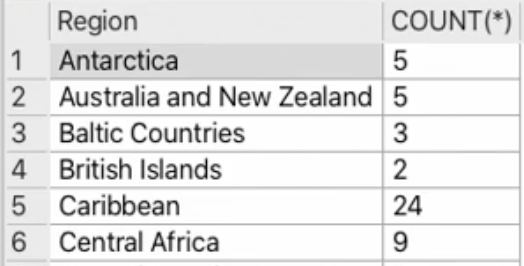
but what if i want to print how many countries are in a specific region?
we can use aggregates functions with GROUP BY in order to groups rows that have the same values into summary rows, like "find the number of customers in each country".
you can use GROUP BY with a condition as well using the following format:
SELECT _column_name(s)_
FROM _table_name_
WHERE _condition_
GROUP BY _column_name(s)
but coming back to our example:
SELECT Region, Count(*)
FROM Country
GROUP BY Region
will call the aggregate function in this case count for each group
if you want to condition the aggregate function you should use the HAVING key word which is the same as WHERE
its important to have a different keyword for this because you might need the where clause for the non-aggregate parts of the query.
for example
SELECT a.title AS Album, COUNT(t.track_number) as Tracks
	FROM track AS t
	JOIN album AS a
		ON a.id = t.album_id
	WHERE a.artist = 'The Beatles'
	GROUP BY a.id
	HAVING Tracks >= 10
	ORDER BY Tracks DESC, Album
this will give all the Beatles albums that have more than 10 tracks in them.
notice that HAVING should be after the GROUP because its a clause on aggregate data.
there are many aggregate function and they all pretty intuitive :
SELECT COUNT(*) FROM Country;
SELECT COUNT(Population) FROM Country
SELECT AVG(Population) FROM Country
SELECT Region, AVG(Population) FROM Country GROUP BY Region
SELECT Region, MIN(Population), MAX(Population) FROM Country GROUP BY Region
SELECT Region, SUM(Population) FROM Country GROUP BY Region
you can use the
DISTINCTkeyword on aggregate functions to ignore elements that was already aggregated.>
sub-queries / sub-selects
the result of a select statement is basically a table.
there are some cases when we might want to query the results tables. by using the () and putting a SELECT in those after
we already created a "parent" select query, we can use the result as a datasource for the select in the parenthesis.
for example assume the table named t with a , b cols.
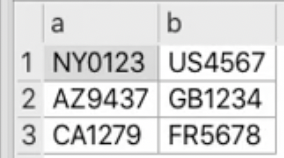
we can separate the characters from the digits by using a select on t in the following way
SELECT co.Name, ss.CCode FROM (
	SELECT SUBSTR(a,1,2) AS State, SUBSTR(a,3) AS SCode,
		SUBSTR(b,1,2) AS Country, SUBSTR(b,3) AS CCode FROM t
	  ) AS ss
	JOIN Country AS co
		ON co.Code2 = ss.Country
what interesting here is that we created a JOIN on the result of the sub-select from the table t. we took the name col from Country and the new CCode from the ss sub-select result.
you can search within a result set using sub-select and the IN keyword. The IN operator allows you to specify multiple values in a WHERE clause as seen in #MySQL Data Types on a SET.
for example :
SELECT * FROM album WHERE id IN ( SELECT DISTINCT album_id FROM track WHERE duration <= 90)
will show all the results in the album table where the id is in the table created from the sub-select .
you can even use JOIN on a sub-select table result for example
SELECT a.title AS album, a.artist, t.track_number AS seq, t.title, t.duraion AS secs
		FROM album AS a
		JOIN (
			SELECT DISTINCT album_id, track_number, duration, title
				FROM track
				WHERE duration <=90
			) AS t
			ON t.album_id = a.id
			ORDER BY a.title, t.track_number
		)
this will join album table with the table created from the sub-select which take all the tracks with duration of less than 90 seconds.
SQL- transaction
in database terminology, a transaction is a group of operations that are handled as one unit of work.
in practice that means that you may have many operations, and if any of them fails the entire group of operations fails.
In SQL, a transaction is a sequence of SQL statements that are executed as a single unit of work. Transactions are used to ensure the consistency and integrity of the data in a database. They allow you to make multiple changes to the database and either commit all the changes or roll them back if any errors or problems occur.
Here are the key features of transactions:
-
Atomicity: Transactions are atomic, which means that they either complete in their entirety or have no effect at all. If any error occurs during the execution of a transaction, the database will roll back the changes to the state it was in before the transaction began.
-
Consistency: Transactions ensure that the data in the database remains in a consistent state. For example, if a transaction involves transferring money from one bank account to another, the transaction will either complete successfully, transferring the money and updating the balances of both accounts, or it will be rolled back, leaving both accounts unchanged.
-
Isolation: Transactions are isolated from each other, which means that the changes made by one transaction are not visible to other transactions until the first transaction is committed. This helps prevent conflicts between transactions and ensures that the data remains consistent.
-
Durability: Once a transaction is committed, the changes it has made to the database are permanent and cannot be undone.
for example, imagine a financial application where several tables need to be updated for a given transaction, if any of the operations fails, corresponding data in other table will be out of sync and invalid.
By combining all the operations in a single transaction the state of the database will be automatically rolled back to a valid state if any of them fails.
BEGIN TRANSACTION
	INSERT INTO table_1
	INSERT INTO table_2
	SELECT FROM table_2
	INSERT INTO table_3
END TRANSACTION
the above operations will be performed as one unit.
- sometimes
COMMITis replacingEND TRANSACTION ROLLBACKin SQL is a transactional control language that is used to undo the transactions that have not been saved in the database. The command is only been used to undo changes since the last COMMIT.
transactions are also used to ensure that concurrent operations result in a state as if they were handled separately and sequentially.
in other words, if many clients use the same database at the same time, and they all conducting similar complex operations grouped into transaction, those transactions will affect the database as if each transaction were completed separately.
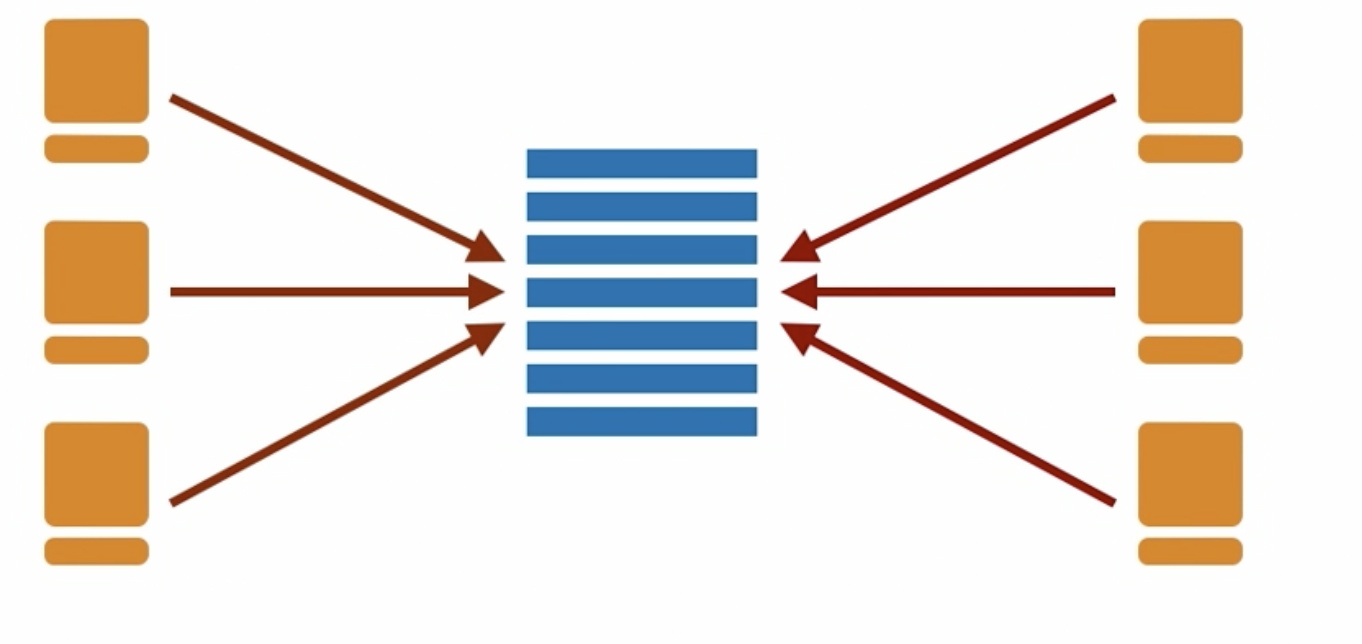
they can also improve performance. for example if you have a lot of rows to insert into a table, or a set of tables, each of these insert take time to write into a storage device. when making individual writes, the database system uses resources to ensure that each row has been committed to storage before the next write begins.
when you make a group of inserts as a transaction, the database system can perform many write operations together.
SQL-triggers
n SQL, a trigger is a stored procedure that is automatically executed by the database in response to a specified event, such as the insertion, update, or deletion of data in a table. Triggers are used to enforce business rules, maintain data integrity, and perform other tasks in the database.
Triggers are created using the CREATE TRIGGER statement and are associated with a specific table in the database. They can be defined to execute before or after the event that triggers them, and they can be defined to execute for each row affected by the event or for the event as a whole.
Here is an example of how to create a trigger in SQL:
CREATE TRIGGER update_total_sales
AFTER INSERT ON sales
FOR EACH ROW
BEGIN
  UPDATE products
  SET total_sales = total_sales + NEW.quantity
  WHERE product_id = NEW.product_id;
END;
notice to the NEW keyword here.
the NEW keyword is used in the body of a trigger to refer to the new row being inserted or updated by the triggering event. It is used in combination with the OLD keyword, which refers to the old row being updated or deleted by the triggering event.
The NEW keyword is only available in triggers that are defined to execute after an insert or update event, and it is used to access the values of the new row being inserted or updated. The NEW keyword can be used in the following ways:
-
To access a specific field in the new row: You can use the NEW keyword followed by the field name to access a specific field in the new row. For example, NEW.field_name will return the value of the "field_name" field in the new row.
-
To access the entire new row as a record: You can use the NEW keyword followed by the asterisk () to access the entire new row as a record. For example, NEW. will return all the fields in the new row as a record.
Applications
Triggers can be useful in a variety of situations, such as:
-
Enforcing business rules: Triggers can be used to enforce business rules and constraints on the data in the database. For example, you might create a trigger to ensure that the salary of an employee is always greater than zero.
-
Maintaining data integrity: Triggers can be used to maintain the integrity of the data by ensuring that related data is consistent across different tables. For example, you might create a trigger to update a total field in one table when data is inserted or deleted in another table.
-
Auditing and logging: Triggers can be used to track changes to the data in the database and log them for auditing or other purposes.
-
Performing actions automatically: Triggers can be used to automatically perform actions in the database when certain events occur, such as sending an email notification or updating a timestamp field.
It's worth noting that triggers can have performance implications and should be used with caution. They can be slower than other methods of enforcing business rules or performing tasks in the database, since they are executed every time the triggering event occurs. In some cases, it may be more efficient to use stored procedures or other methods to perform the same tasks.
preventing updates
triggers may use to prevent changes to rows that have already been reconciled or should not be changed for other reasons.
lets examine the next query
CREATE TRIGGER updateWidgetSale BEFORE UPDATE ON widgetSale
	BEGIN
		SELECT RAISE(ROLLBACK, 'cannot update table "widgetSale"') FROM widgetSale
			WHERE id = NEW.id AND reconciled =1
	END
this will raise an exception if an item with an id is already reconciled.
notice the ROLLBACK keyword which talked about on #SQL- transaction. this will rollback this update and revert it.
the RAISE statement is used to raise an exception or signal an error condition. It is typically used in the body of a trigger, stored procedure, or function to signal an error or exception and cause the current operation to be rolled back.
The RAISE statement takes a single argument, which can be a user-defined exception or a predefined exception. A user-defined exception is a custom error message that you define, while a predefined exception is one of the built-in error messages provided by the database management system.
Here is an example of how to use the RAISE statement in a trigger:
CREATE TRIGGER salary_greater_than_zero
BEFORE INSERT ON employees
FOR EACH ROW
BEGIN
  IF NEW.salary <= 0 THEN
    RAISE EXCEPTION 'Salary must be greater than zero';
  END IF;
END;
In this example, the trigger is defined to execute before an insert event on the "employees" table and checks the value of the "salary" field in the new row being inserted. If the salary is less than or equal to zero, the trigger raises an exception with the message "Salary must be greater than zero".
The RAISE statement can be used to signal any error or exception condition in a trigger, stored procedure, or function. When an error is raised, the current operation is rolled back and the error message is returned to the caller.
It's worth noting that the syntax for the RAISE statement varies depending on the database management system you are using. Some systems, such as PostgreSQL, use the RAISE statement with the EXCEPTION keyword to raise an exception, while others, such as MySQL, use the SIGNAL statement to signal an error. You should consult the documentation for your specific database management system for more information on the syntax and usage of the RAISE or SIGNAL statement.
SQL-indexes
In SQL, an index is a data structure that is used to improve the performance of queries by providing faster access to the data in a table. Indexes are created on one or more columns in a table and are used to quickly locate rows based on the values in the indexed columns.
An index is essentially a "list" of pointers to the location of data in a table. When a query is executed, the index can be used to locate the data more quickly than if the query had to scan the entire table.
There are several types of indexes in SQL, including:
-
Clustered indexes: A clustered index determines the physical order of the rows in a table based on the indexed columns. There can be only one clustered index per table.
-
Nonclustered indexes: A nonclustered index does not affect the physical order of the rows in a table. A table can have multiple nonclustered indexes.
-
Unique indexes: A unique index ensures that the indexed columns do not contain duplicate values.
-
Full-text indexes: A full-text index is used to index large amounts of text data for fast searching.
To create an index in SQL,
most databases use B-trees for their indexes inorder to drastically reduce the number of comparisons in order to find an object in a larger data structure.
use cases:
- Rapid lookup
- Enforcing constraints
- Ordered queries
indexes cost:
- write operations - for each write operation on a table with indexes, there is at least one corresponding operation on the index and sometimes more.
- Storage space
when to use?
- primary key index
- Columns used for
ORDER BY - Columns used in
WHEREclauses
Creating an index
let see the next table creation
CREATE TABLE test (
	id INT UNSIGNED NOT NULL AUTO_INCREMENT PRIMARY KEY,
	string1 VARCHAR(128) UNIQUE,
	string2 VARCHAR(128)
);

SHOW INDEX FROM test;
we will see that 2 indexes are created automatically

- when you dont define keys that are automatically becomes indexes the search in this table will be linear which can affect performance.
you can create a table in index definition for example :
CREATE TABLE test (
	id INT UNSIGNED NOT NULL AUTO_INCREMENT PRIMARY KEY,
	string1 VARCHAR(128) UNIQUE,
	string2 VARCHAR(128)
	UNIQUE INDEX i_str2 (string2)
);
the UNIQUE key word is not mandatory.
you can use the CREATE INDEX statement outside of table definition as well:
CREATE INDEX idx_name ON employees (name);
use the
SHOW INDEX FROMto see the indexes for a table. and you can use theSELECT DISTINCT table_name, index_name FROM information_schema.statistics WHERE table_schema = 'database_name'to see all the indexes of the database using the information_scheme
of course you can drop an index at any time using DROP syntax
Multicolumn indexes
you can create index on multiple cols using this syntax
CREATE INDEX searchIndex ON Student(name, degree)
The index is sorted by name, then by degree.
its very useful when we want to search in a query where name has a higher priority in the search. what will happen behind the scene is that a SELECT method will use the searchIndex key to perform the query.
use the
EXPLAINkeyword before query to see how the sql database performed the query.
in general There are different types of indices that sql can use to perform a search:
• Sorted (tree-based)
• Hash
• Indices to enforce keys and constraints
SQL-View
in SQL you can save a query as a view, you can use that view as if it were a table.
In SQL, a view is a virtual table that is created based on a SELECT statement. A view can be thought of as a stored SELECT statement, or a virtual table that is based on the result set of a SELECT statement.
for example lets take a simple query
SELECT id, album_id, title, track_number, duration / 60 AS m, duration %60 AS s, FROM track
we can save this query as a VIEW for later use:
CREATE VIEW trackView AS
	SELECT id, album_id, title, track_number, duration / 60 AS m, duration %60 AS s, FROM track
now we can use trackView for a query.
SELECT a.title AS album, a.artist, t.track_number AS seq, t.title, t.m,t.s
FROM album AS a
JOIN trackView AS t
	ON t.album_id = a.id
ORDER BY a.title
you can imagine it as an alias for a subquery under the hood. behind the scene its just an alias for the table we created.
views can be more efficient than subqueries because they are pre-compiled and stored in the database, which means that the database server only needs to execute the pre-compiled version of the view's SELECT statement when the view is queried. This can be more efficient than executing a subquery, which is a SELECT statement that is embedded within another SELECT statement and is executed every time the outer query is run.
View Types
There are two main types of views in SQL:
-
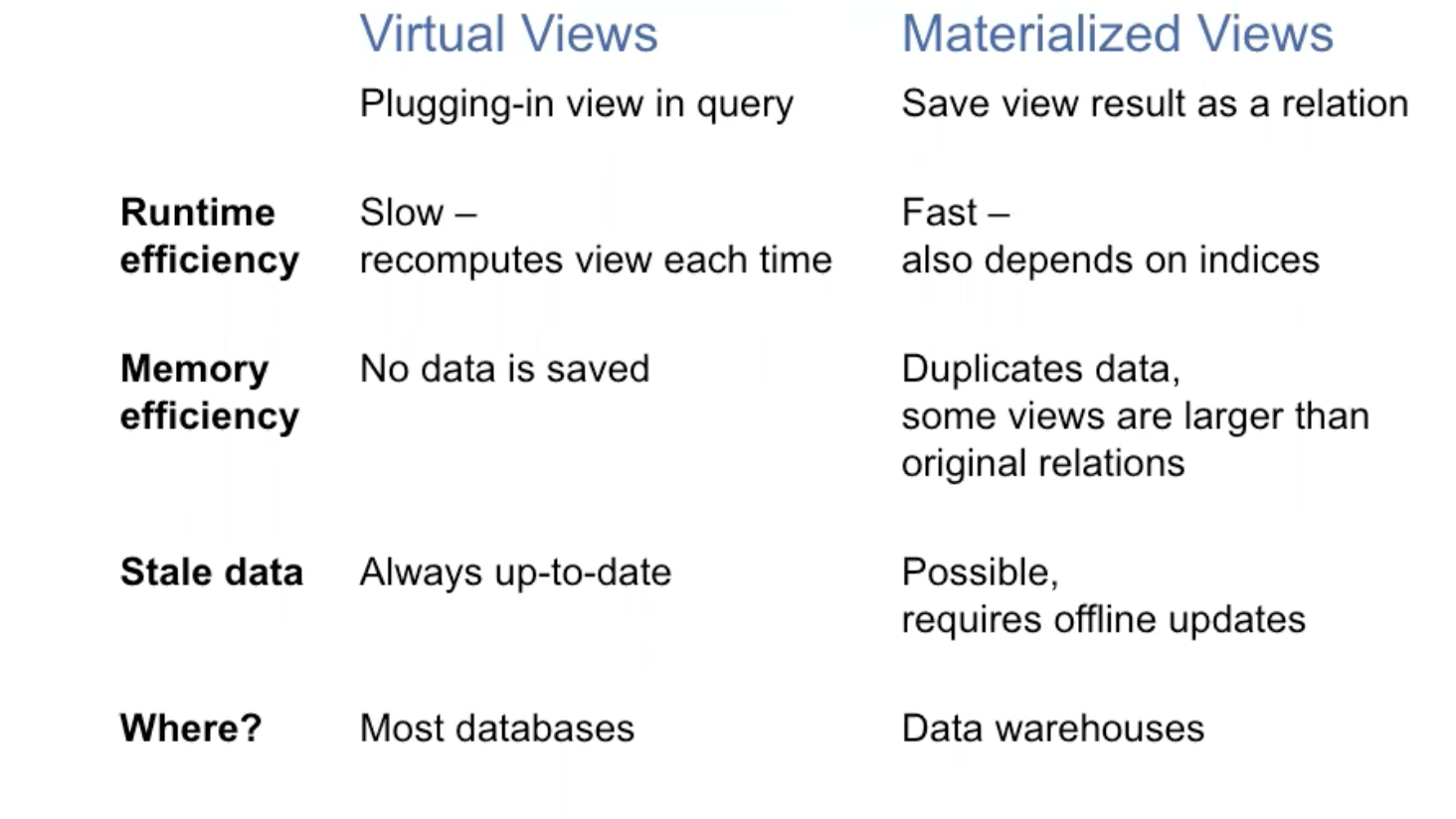
Materialized views: A materialized view is a pre-computed table that is stored on the database server. When you query a materialized view, the database server returns the pre-computed data stored in the view, rather than executing the SELECT statement again. Materialized views are used to improve the performance of queries by reducing the need to execute the SELECT statement each time the view is accessed.
-
Virtual views: A virtual view, on the other hand, is not stored on the database server. It is created on-the-fly when you query it, by executing the SELECT statement defined in the view. Virtual views do not store any data, and are used to simplify complex queries by breaking them down into smaller, more manageable pieces.
In general, materialized views are used to improve query performance when the data in the view is static or changes infrequently, while virtual views are used when the data in the view is dynamic or changes frequently.
Here is an example of a virtual view in SQL:
CREATE VIEW virtual_view AS
SELECT * FROM users WHERE age > 30;
This creates a virtual view called "virtual_view" that displays all rows from the "users" table where the "age" column is greater than 30.
To create a materialized view, you will need to use a CREATE MATERIALIZED VIEW statement, which is specific to the database management system you are using. Here is an example of a materialized view in PostgreSQL:
CREATE MATERIALIZED VIEW materialized_view AS
SELECT * FROM users WHERE age > 30;
Note that the syntax for creating materialized views may vary slightly between different database management systems. Consult your database's documentation for more information.
Creating a joined view
you can create a view from a joined table. for example:
create VIEW joinedAlbum AS
SELECT a.artist AS artist,
	a.title AS album,
	t.title AS track,
	t.track_number AS trackno,
	t.duration / 60 AS m,
	t.duration % 60 AS s,
FROM track AS t
	JOIN album AS a
		ON a.id = t.album_id
and now you can use this view just like a table. this make the syntax much easier to read instead of overview of SQL#sub-queries / sub-selects
View Updates
There are several key differences between views and tables:
-
Structure: A view does not have a physical structure and does not take up any space in the database, while a table has a physical structure and occupies space in the database.
-
Data storage: A view does not store data, while a table stores data.
-
Modification: Data in a view cannot be modified directly, while data in a table can be modified directly.
-
Performance: Views can be slower than tables because they are created and stored as SELECT statements, which need to be executed every time the view is queried. Tables, on the other hand, are stored in the database and can be accessed more quickly.
-
Security: Views can be used to limit access to data by only showing a subset of the data in a table. Tables, on the other hand, provide direct access to all the data they contain.
in short, the main difference is that View represents a query and so updating a view does not necessarily effect the database.
Non-updateable views
• When we need to update several tables
• When the SELECT uses a column more than once
• When DISTINCT is used
• When there is an Aggregate, GROUP BY
• When there is UNION (ALL)
in general it is not a good concept to update a view...